

Build an Expert Advisor for MetaTrader 5 without writing a single line of code. No-code and visual EA builders let you design trading strategies with indicators, conditions, and risk rules — then export production-ready MQL5 for the MT5 Strategy Tester or live deployment. For Pine Script v6 (TradingView), the Strategy Builder has a separate Pine form — see Build a Pine strategy without coding. Whether you're new to Expert Advisors or an experienced trader who prefers logic over syntax, this guide explains your options and how to go from idea to working automation in hours instead of weeks.
Can I build an MT5 EA without coding?
Yes. The fastest path to a working MT5 EA without coding is AlfaTactix Strategy Builder: six guided steps (strategy → timeframes → signals → filters → risk → save), then export MQL5 from the Code Generator and test in Strategy Tester. If you know the rules in words but not which fields to pick, Tactix AI helps fill those steps in plain language — not a raw ChatGPT MQL5 dump.
What you will get from this guide:
- Which no-code path fits your goals best
- How to go from visual strategy to generated MQL5
- How to backtest and deploy safely after export
- When coding still makes more sense than no-code
Related guides: What is an Expert Advisor? · MT5 EA builders compared: fxDreema vs EA Builder vs StrategyQuant X · Create and Edit an MT5 EA · Can ChatGPT Write an MT5 EA? · Build a Pine strategy without coding · EA Strategy Library · Backtest in Strategy Tester
Build Your MT5 EA with AlfaTactix Strategy Builder (2026)
Short answer: Open the Strategy Builder demo, complete the six steps (optionally with Tactix AI for Step 3–5 guidance), create a free account to save, then generate MQL5 in the Code Generator. You get structured logic (not a chat transcript), broker-aware risk blocks, and repeatable exports — the same workflow professional teams use for rule-based systems.
| Step | You do | Why it beats ad-hoc AI code |
|---|---|---|
| 1 | Name strategy + market | Documented from day one |
| 2 | Pick the strategy's timeframe | No mixed-timeframe bugs |
| 3 | Indicators + AND/OR conditions | Visual audit trail |
| 4 | Spread, session, ATR filters | Matches scalping and gold best practices |
| 5 | SL/TP, sizing, drawdown caps | Reduces live errors like 10016 |
| 6 | Preview & save | One source of truth for export |
Desktop: full builder + MetaEditor compile + Strategy Tester. Mobile: monitor Demo/live; design on desktop for best UX.
First session goal: Complete Steps 1–3 only in the live demo — one indicator, one entry rule you can say aloud. Save when the tree matches that sentence; Steps 4–5 can wait until a second sitting.
Which is better for an MT5 EA: ChatGPT or a visual builder?
For a rough draft: ChatGPT is fastest. For a broker-safer, repeatable EA: a visual builder is usually better because structure, risk blocks, and export are built in. Many traders use no-code for the base and AI only to explain compile errors — not to invent the whole architecture.
| ChatGPT | Visual no-code builder | |
|---|---|---|
| Output | Text you paste into MetaEditor | Exported .mq5 from defined steps |
| Syntax risk | MQL4/MQL5 mix common | Lower — generator targets MQL5 |
| Broker checks | Only if your prompt asks | Often included in risk step |
| Best use | Learning, small edits | Rule-based strategies at scale |
Full limits, prompt template, and fixes: Can ChatGPT Write an MT5 EA?. Community test: MQL5.com — ChatGPT MT5 EA experiment (2026) [1].
Why Consider No-Code?
You want an Expert Advisor for MetaTrader 5, but you don't have time to learn MQL5 — or you prefer to focus on trading logic rather than syntax. No-code and visual EA builders let you design strategies with drag-and-drop, then export real MQL5 code. Beyond convenience, they offer two compelling advantages: time and cost savings, and full control over your strategy.
Save Time and Money
Learning MQL5 from scratch takes weeks or months. Hiring a developer to build a custom EA can cost hundreds or thousands of dollars, and you depend on someone else to implement changes. No-code builders cut both: you can go from idea to a working EA in hours instead of weeks, and you avoid ongoing development fees. Surveys of low-code and no-code adoption often report meaningful productivity gains—teams frequently cite less time spent on hand-written code and lower dependence on specialist developers, though results vary by team and tool. The same logic applies to trading: why spend months learning syntax when you can focus on what matters — your strategy?
Full Control Over Your Strategy
With a no-code EA builder, you design the logic. You choose the indicators, set the entry and exit conditions, add market filters, and configure risk management — all without handing your ideas to a third party or wrestling with code. Every change is yours to make, instantly. No back-and-forth with a developer, no "I'll need a few days to update that." You retain full ownership of your trading system and can iterate as often as you like. This democratization of development — putting the power to build in the hands of the strategy owner — is a core benefit of no-code platforms across industries.
This article explains your options and how to get from idea to working EA without writing a single line of code.
Three Ways to Get an Expert Advisor
Every trader who wants automation faces the same question: How do I get from idea to working EA? There are three paths — and the right one depends on your priorities, not on which is "best" in the abstract.
| Path | Best for | What you get |
|---|---|---|
| 1. Code it yourself | Traders who enjoy programming or want maximum flexibility | Full control, no ongoing fees, deep understanding of every line. Our MQL5 tutorials take you from zero to your first EA — start with Build Your First EA and the MQL5 Reference. |
| 2. AlfaTactix Strategy Builder | Traders who want strategy-first, production MQL5 | Six-step guided flow → save → Code Generator → MT5. Ideal for rule-based EAs with filters and risk built in. |
| 3. ChatGPT / AI draft | Fast prototype if you will review and test | MQL5 draft in minutes — expect compile fixes and missing broker rules. See Can ChatGPT Write an MT5 EA? before going live. |
| 4. Hire a developer | Traders with complex custom needs and budget | A tailored EA built to your exact spec. You provide the strategy; they handle implementation. Good when you need highly specialised logic or integration. |
Code it yourself — If you enjoy learning and want complete freedom to implement any logic, MQL5 is a skill that lasts a lifetime. Our MQL5 tutorials take you from environment setup to your first EA. The upfront investment in learning pays off in long-term independence.
Use AlfaTactix Strategy Builder — If your priority is to turn ideas into working EAs quickly, the six-step builder validates logic before export. You keep full ownership, iterate in minutes, and avoid the MQL5 learning curve — ideal when your edge is strategy design, not syntax. After export, follow Create/Edit MT5 EA for compile and attach steps.
Hire a developer — If you have a detailed specification and prefer to outsource, a skilled MQL5 developer can build exactly what you describe. Best when the strategy is highly custom or you have budget but limited time. You receive the EA and source code; changes may require further engagement.
The smart approach: Many traders start with a no-code builder to validate their idea quickly, then either stick with it (if it fits) or learn MQL5 to extend what they've built. Others go straight to coding because they enjoy it. There's no wrong choice — only the choice that fits your time, goals, and style.
What is a No-Code EA Builder?
A no-code EA builder is a visual tool that lets you configure your trading strategy — indicators, entry/exit conditions, market filters, risk management — and then generates MQL5 code for MetaTrader 5 automatically. The idea is simple: you describe what the EA should do; the tool handles how it gets implemented in code.
Different Approaches
No-code EA builders vary in how they work. Some use drag-and-drop blocks or flow diagrams — you connect signal blocks, filters, and risk modules in a canvas. Others use wizard-style steps — you answer a sequence of questions and the tool assembles the EA. A few rely on AI or natural language — you describe your strategy in plain English and the system generates code. Each approach has trade-offs: blocks give flexibility but can become messy for complex logic; wizards can feel rigid; AI is fast but may produce code that's hard to tune or debug.
What Makes a Builder Precise and Reliable
The best no-code builders share a few traits. Structured flow — a clear sequence (strategy definition → timeframe → conditions → filters → risk) so you never skip a critical piece. Timeframe clarity — a single, explicit timeframe per strategy avoids the common mistake of mixing long-term and short-term logic in one place; multi-timeframe separation, where a builder offers it, is a further step up. Real-time validation — the builder catches incomplete or inconsistent rules before you export, so the generated EA behaves exactly as intended. Rich condition library — not just "RSI above 70" but crossovers, slope checks, comparisons between indicators, and logical grouping (AND/OR/NOT) so you can express nuanced strategies without coding. Nested groups let you build complex logic with conditions inside conditions. Advanced indicator settings — tune parameters (periods, smoothing, applied price) per indicator for precise control. Production-ready output — clean, modular MQL5 that compiles in MetaEditor and runs in the Strategy Tester without surprises.
When you evaluate a no-code builder, look for these: the more structured and validated the design process, the more precise and reliable the EA you get.
What Can You Build Without Code?
A good no-code EA builder lets you create rule-based strategies — you define the logic with indicators, conditions, filters, and risk rules; the tool generates real MQL5 that runs in MetaTrader 5. You're not limited to signals or alerts; you get executable Expert Advisors that open and close trades automatically.
| Category | What you can build |
|---|---|
| Indicators & conditions | RSI, MACD, moving averages, Bollinger Bands, ATR, and more. Conditions: crossovers, above/below levels, comparisons between indicators, slope checks, and more. Combine with AND/OR/NOT and brackets. Advanced indicator parameters — periods, smoothing, applied price per indicator. Nested groups — conditions inside conditions for complex logic. |
| Market filters | ATR-based volatility filters, session filters (e.g. London/NY), time range, liquidity filters. Filter conditions — rich conditions inside each filter (e.g. ATR above threshold, spread within range). Define when the EA is allowed to trade. |
| Risk management | Powerful risk manager: position sizing (fixed, account %, ATR-based), Stop Loss, Take Profit, trailing stops, breakeven, partial closes, max drawdown limits, daily loss caps, account protection rules — and more. See EA Risk Management for best practices. |
| Structure | One timeframe per strategy today (multi-timeframe logic is in development). Independent rules for Long and Short. Nested groups for sophisticated logic. For hand-coded multi-timeframe MQL5, see Advanced EA: Multi-timeframe & Filters. |
For most indicator-based strategies with market filters and risk controls, a no-code builder covers what you need. Highly custom algorithms or exotic logic may still require hand-coded MQL5 — see our Build Your First EA and EA Risk Management guides for the coding path. The majority of systematic trading ideas fit the rule-based model. In the next section we'll see how AlfaTactix brings these elements together in a structured flow.
How AlfaTactix Strategy Builder Works
AlfaTactix Strategy Builder is a guided six-step workflow for traders who want speed without giving up control. You define structure before code: market context, timeframe, signals, filters, and risk — each step validated in real time so incomplete logic never reaches code generation. Paid plans use one timeframe per strategy today; multi-timeframe logic is in development. Tactix Studio goes further than a field-by-field helper: describe your strategy in one sentence and it drafts Timeframe, Signals, Filters, and Risk across the whole form for you to review — it is not a ChatGPT-style MQL5 dump.
Step 3 — Signals (Entry Signals) is where entry logic takes shape. You configure buy and sell conditions per timeframe, tune every indicator parameter, and build conditions with logical operators. Combine indicators with AND, OR, NOT, parentheses, and grouped expressions so complex rules stay readable — then the generator turns that definition into MQL5. The screenshot below is taken from this step in the live builder.
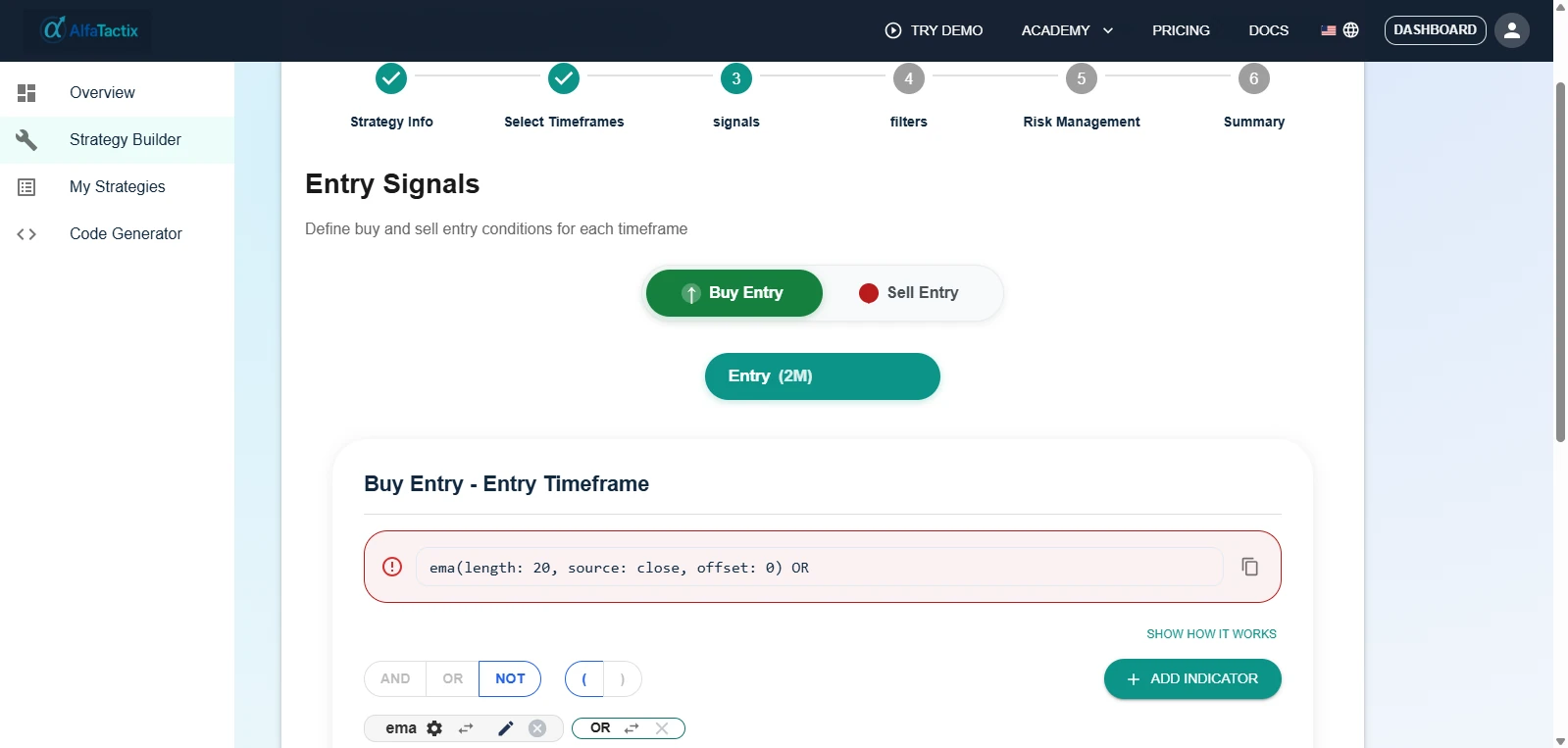
That design-first discipline matters because most EA failures begin before a single line of code: mixed timeframes, asymmetric entries and exits, or weak risk rules. Locking in structure early yields cleaner, more testable systems. Once saved, the same definition exports as production-ready MQL5 from the generator.
Iteration stays fast and safe: change a rule, regenerate, and retest in MT5 Strategy Tester without rewriting boilerplate. You focus on robustness and edge cases; the platform keeps code output consistent. For rule-based strategies, that shortens the path from idea to a verified EA.
The Six-Step Flow
| Step | What you do | Why it matters |
|---|---|---|
| 1. Strategy Information | Name your strategy, define the target market, write a short description | Your idea is documented from day one — when you revisit months later, you know exactly what each strategy was designed to test. |
| 2. Timeframe | Choose the single timeframe the strategy trades on | Paid plans use one timeframe per strategy; multi-timeframe logic is in development. |
| 3. Signals | Add indicators (RSI, MACD, MA, Bollinger, ATR, and more) with advanced parameters (periods, smoothing, applied price). Build conditions (crossovers, comparisons, slope checks, and more) with AND/OR/NOT logic and nested groups | Separate rule sets for Long and Short. Rich condition library — no coding required. |
| 4. Market Filters | Configure ATR, session, time range, liquidity filters. Filter conditions — apply rich conditions inside each filter (e.g. ATR above X, spread below Y) | Define when the EA is allowed to trade. Filters are kept separate from entry logic for clarity. |
| 5. Risk Management | Powerful risk manager: position sizing, Stop Loss, Take Profit, trailing stops, breakeven, partial closes, drawdown limits, daily loss caps, account protection — and more | Different settings for Long and Short. The UI blocks you from saving until risk is complete and coherent. |
| 6. Preview & Save | Review the full strategy summary, save to your account | One place to see everything. Clone, version, and iterate without re-entering details. |
Real-time validation runs at every step. Incomplete conditions, unbalanced brackets, or conflicting filters are caught before you proceed — so the strategy that reaches the generator is internally consistent and ready to become code.
Generate Code in Your Preferred Language
Once your strategy is saved, the Code Generator turns it into executable trading code. You choose the target language and platform; the generator engine produces clean, modular code from your single strategy definition.
| Language | Platform | Status | Use case |
|---|---|---|---|
| MQL5 | MetaTrader 5 | Available | Expert Advisors for Forex, CFDs, commodities — production-ready today. |
| Pine Script v6 | TradingView | Available | Chart strategies and Strategy Tester on TradingView — export .pine, paste in Pine Editor. |
| Python | Backtrader, Zipline | In development | Research, backtesting, and quant workflows. |
| C# | QuantConnect LEAN | In development | Institutional-grade backtesting and live trading. |
One form per platform. You pick the platform when you start a strategy: the MQL5 form generates MQL5, the Pine form generates Pine Script v6. Both forms are available now (the Dual Export plan includes both); Python and C# remain in development. The architecture stores your strategy as structured data you can audit and version.
TradingView path: Same six steps → Code Generator → Pine Script → Pine Editor setup → TradingView Strategy Tester. Full twin guide: Build a Pine strategy without coding. Browse playbooks: Pine Strategy Library.
MT5 export loop: Live demo → save strategy → Code Generator → download .mq5 → compile once → Strategy Tester. Stop after one full loop before starting a second strategy.
Step-by-Step: Design → Export → Test → Deploy
Here's the exact workflow from idea to running code in your preferred platform — no shortcuts, no hand-waving.
1. Design in Strategy Builder
Open the Strategy Builder and build your strategy visually: name it, set timeframes, add indicators and conditions, configure market filters, define risk rules. Stuck on which filter or risk field to use? Ask Tactix AI in plain language, then confirm the tree yourself. The builder validates each step in real time. When everything is complete, create a free account if you have not already, and click Save. Your strategy is stored as structured data — not as code yet. You can clone it, edit it, or create variants without touching a single line.
2. Save and Open Code Generator
Once saved, go to the Code Generator. Select the strategy you just built from your saved strategies list. The generator reads your strategy definition and prepares to output executable code.
3. Choose Language and Generate
Pick the target language and platform you actually use:
| Output | Status | Where you use it |
|---|---|---|
| MQL5 | Available | MetaTrader 5 — compile in MetaEditor, run in Strategy Tester or attach to a chart for live/demo trading |
| Pine Script v6 | Available | TradingView — paste into Pine Editor, run the Strategy Tester on the chart (setup guide) |
| Python | In development | Backtrader, Zipline — use in your quant research or backtesting pipeline |
| C# | In development | QuantConnect LEAN — deploy to QuantConnect for institutional-grade backtesting and live trading |
Click Generate. The platform produces a file (e.g. .mq5 or .pine) that matches your strategy logic. Download it.
4. Use It in Your Platform
For MQL5 (available now): Copy the file into your MetaTrader 5 MQL5/Experts folder, compile in MetaEditor, then run it in the Strategy Tester or deploy to Demo/Live.
For Pine Script v6 (available now): Open Pine Editor, paste the .pine export, Save, Add to chart, then run the Strategy Tester. Step-by-step: Pine Editor setup · full no-code tour: Build Pine without coding. TradingView Basic limits (one timeframe, max two indicators) apply on that track — see the Pine hub.
For Python/C# (in development): Integrate the generated code into your existing backtesting or live trading setup when those engines ship.
Two live platforms today, one form each. Generate MQL5 for MetaTrader 5 from the MQL5 form, or Pine Script v6 for TradingView from the Pine form. Python and C# remain on the roadmap.
When to Use No-Code vs When to Code
The right choice depends on your goals, time, and the complexity of your strategy — not on which approach is "better" in the abstract.
When No-Code Fits Best
| Situation | Why no-code works |
|---|---|
| Retail traders (e.g. $10K–$500K volume/month, trading under 100 times/month) | Need simple, automated tools for strategy building and backtesting — no-code delivers code-free strategy creation and auto-execution without learning MQL5. |
| Fast prototyping | Build complete algorithmic strategies in under 10 minutes with a visual builder; iterate on ideas in hours instead of weeks. |
| Cost and time pressure | Launch ready-to-use strategies in about 1 week instead of 3 months; reduce dependency on developers or freelancers. |
| Trading educators | Use interactive, visual platforms to teach algo trading — students see logic without wrestling with syntax. |
| Strategy transparency | Visual logic is easy to audit and explain — important when you need to document or share your approach. |
| Emotion-free execution | Fully automated execution removes fear, greed, and overthinking; auto-validation and rollback help avoid costly mistakes. |
No-code is ideal when your strategy is rule-based — indicators, conditions, filters, risk rules — and you want to focus on the logic, not the code. Most systematic trading ideas fit this model.
When Coding Makes Sense
| Situation | Why coding is better |
|---|---|
| Highly custom logic | Exotic algorithms, complex math, or logic that goes beyond standard indicators and conditions. |
| Maximum flexibility | Need every line of code under your control — custom order types, broker-specific APIs, or non-standard execution. |
| Platform-specific features | Require MQL5 features or integrations that a visual builder cannot express. |
| Learning and ownership | You enjoy programming and want deep understanding of every part of your EA. |
Coding gives you full control when you need logic that rule-based builders cannot express. If you choose that path, start with Build Your First EA and the MQL5 Programming Reference. There is no wrong choice — only the one that fits your time, goals, and style.
Next Steps
You have clear paths — pick the platform that matches where you trade.
No-code MT5 path: Start with a strategy-specific walkthrough — MA Crossover EA — No Code — or browse the EA Strategy Library → Strategy Builder → optionally Tactix AI → free account to save → Code Generator → generate MQL5 → backtest → deploy to Demo or Live.
No-code TradingView path: Pine form of the builder → Code Generator → Pine Script v6 → Pine Editor setup → Strategy Tester. Twin tour: Build a Pine strategy without coding. Browse: Pine Strategy Library · Pine Script hub.
Coding path (MT5): Start with Build Your First EA, then the MQL5 Reference. Add risk management and MTF filters as you grow.
Choose your path: Live demo for either export, or stay on this page for the MT5 no-code deep dive.