

Build an EA for Gold (XAUUSD) in MQL5: Sizing, Stops, Spread and an ATR Filter
How Should You Build an MT5 EA for Gold (XAUUSD)?
Short answer: an EA for gold must read the symbol from your broker instead of reusing forex numbers. Read the money value of a price move (tick size, tick value, contract size) to size each trade from its stop, the stop and freeze levels to place valid stops, and the volume step to round the lot. Add a spread limit and a volatility filter, use an ATR-based stop, trade one position at a time with no grid and no martingale, and test on real ticks of your broker's XAUUSD before a demo run. This guide shows each step, a no-code version (an RSI rule with an ATR filter in the AlfaTactix Strategy Builder), and the MQL5 it generates.
This page gives procedures, not typical values: gold's contract size, spread and stop level differ between brokers and account types, so every number you need comes from your own terminal. It shows no backtest results.
Part of the MQL5 and Expert Advisors academy.
Why Gold Is Not EURUSD: Read It From Your Broker
| What | Read it with | Why it matters on gold |
|---|---|---|
| Contract size | SYMBOL_TRADE_CONTRACT_SIZE | How many ounces one lot is; it differs between brokers |
| Tick size and tick value | SYMBOL_TRADE_TICK_SIZE, SYMBOL_TRADE_TICK_VALUE | The money one price step is worth per lot: the base of the lot size |
| Digits and point | SYMBOL_DIGITS, SYMBOL_POINT | A "point" on gold is not a forex pip, so pip-based code is wrong here |
| Stop and freeze level | SYMBOL_TRADE_STOPS_LEVEL, SYMBOL_TRADE_FREEZE_LEVEL | The nearest a stop may be, and the zone where an order cannot be changed |
| Volume limits | SYMBOL_VOLUME_MIN, SYMBOL_VOLUME_STEP, SYMBOL_VOLUME_MAX | The lot must be a multiple of the step |
| Spread | SYMBOL_SPREAD | Wider at the daily rollover and in thin hours |
| Trading hours | The symbol's sessions | Gold CFDs often have a daily break; an order then fails |
In MQL5, the price and money properties come from SymbolInfoDouble (opens in a new tab) [1]; the full list of symbol properties [2] explains each one. Without code: in MetaTrader 5, open Market Watch, right-click your gold symbol and choose Specification [3]. Write down the values, because the next sections use them. Integer properties such as the spread and the stop level come from SymbolInfoInteger [4], and the trading hours from SymbolInfoSessionTrade [5].
Lot Size for Gold From Tick Value
Size every trade from its stop, never from a fixed lot:
- money lost per 1.0 lot at the stop = stop distance ÷ tick size × tick value;
- lots = the money you risk ÷ that loss, rounded down to the volume step;
- below the minimum volume, skip the trade rather than round up.
Worked example (an example specification, not a broker quote): if your Specification window shows a tick size of 0.01 and a tick value of 1.00 in your account currency, a stop 5.00 away from the entry is 500 ticks, so 1.0 lot loses 500 at the stop. Risking 1 % of a 10,000 account (100) gives 100 ÷ 500 = 0.2 lots, rounded down to your volume step. With a different contract size the tick value changes, and so does the lot: that is why the EA must read it.
More on position size, daily loss limits and drawdown: EA risk management.
Stops, Spread and Sessions on XAUUSD
Stops. A stop copied from a forex EA in pips means nothing on gold. An ATR multiple sizes the stop from recent volatility: wider when the market moves a lot, tighter when it is calm. Whatever the method, the stop must also clear the stop level plus the spread, or the order is refused with error 10016: see MT5 error 10016.
Spread. Gold's spread changes during the day. Read SYMBOL_SPREAD (opens in a new tab) during the hours your EA trades and set the limit from what you see. A limit tied to volatility, "the spread is at most a share of the ATR", needs no fixed number.
Sessions. Many rule-based gold EAs trade only the London and New York sessions and skip the thin hours and the daily break. Check your broker's trading hours for the symbol before you choose.
Volatility filter. A simple filter that keeps the EA out of flat, quiet markets is "ATR(14) above its 50-bar average"; the builder offers it as the quick filter Skip quiet markets.
No Grid, No Martingale
Many gold EAs sold online add orders as the price moves against them (a grid) or raise the size after a loss (martingale). Both turn a run of ordinary losses into one large loss, and a backtest that ended before that run shows nothing of it. Before you run any gold EA, read its settings for "grid", "step", "multiplier" or "recovery".
The AlfaTactix builder has no grid of orders and no martingale (raising the size after a loss); Tactix Studio says so and builds neither. Studio never sets risk above 10 % of the account per trade.
Build a Gold EA Without Code: RSI Rule and ATR Filter
The AlfaTactix Strategy Builder is a form in 7 steps. One set of rules, built for MQL5 or Pine Script v6: a strategy is built for one platform at a time, and Step 1 switches it. Here is the gold recipe from the demo:
| Step | What you set |
|---|---|
| 1. Information and platform | Name, MetaTrader 5 (MQL5), market: Metals (gold and silver, such as XAUUSD) |
| 2. Timeframes | H1 as the Trading timeframe |
| 3. Entry rules | Buy rule: RSI(14) crosses above its oversold level (30); switch on Sell mirrors Buy: sell when RSI(14) crosses below its overbought level (70) |
| 4. Filters | Market sessions: London and New York; the quick filter Skip quiet markets (ATR(14) above its 50-bar average); a Spread limit as A share of the ATR where your plan has it |
| 5. Exits | Stop loss as an ATR multiple (fixed when the trade opens); Take profit as an R multiple, or Exit by signal |
| 6. Risk and money management | Risk per trade (% of the account); Open positions: 1; a Daily loss limit |
| 7. Review and save | Fix the Check list, Save strategy, then Backtest this strategy or Get the code |
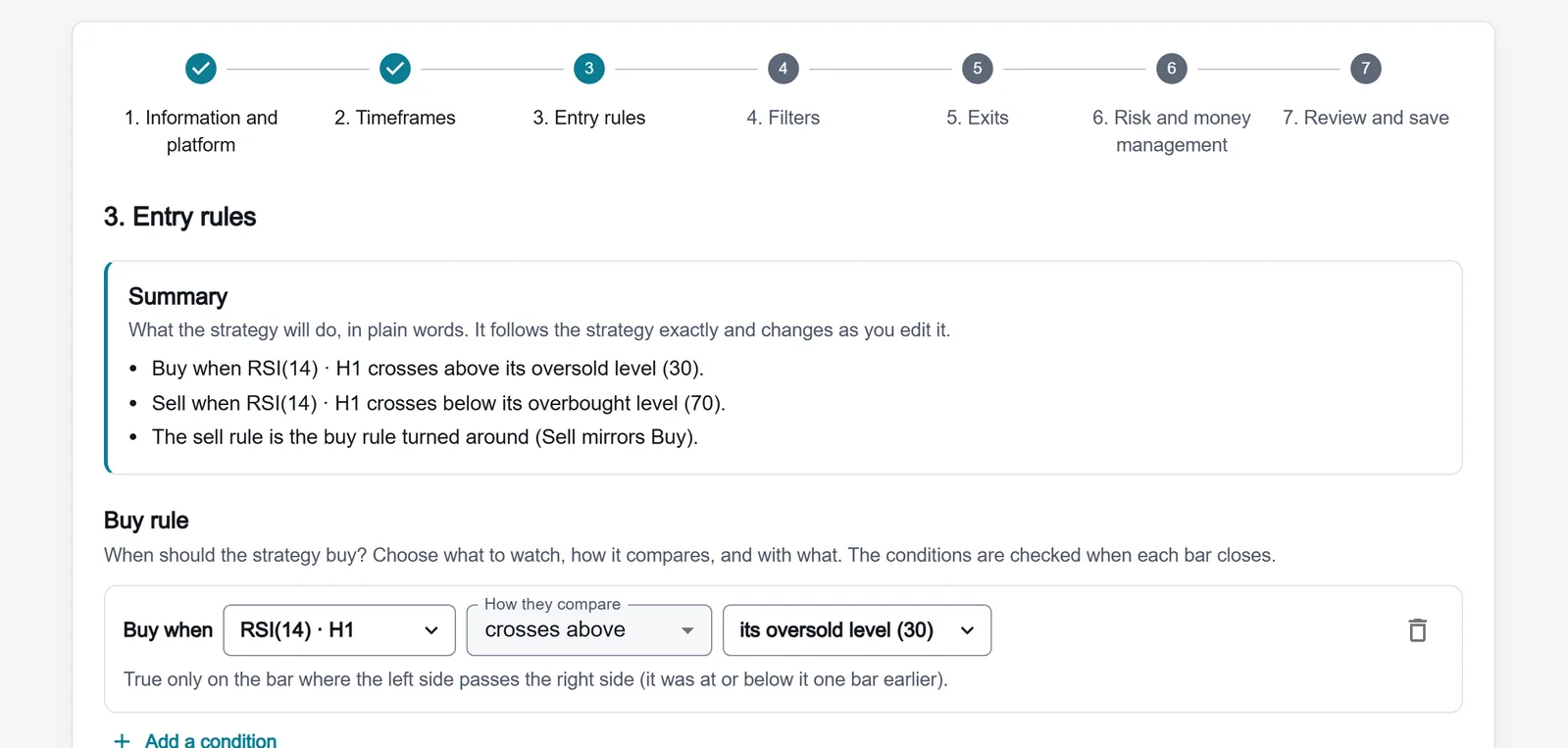
Step 3 reads the rule back in plain words: buy when RSI(14) · H1 crosses above its oversold level (30); sell when it crosses below its overbought level (70).
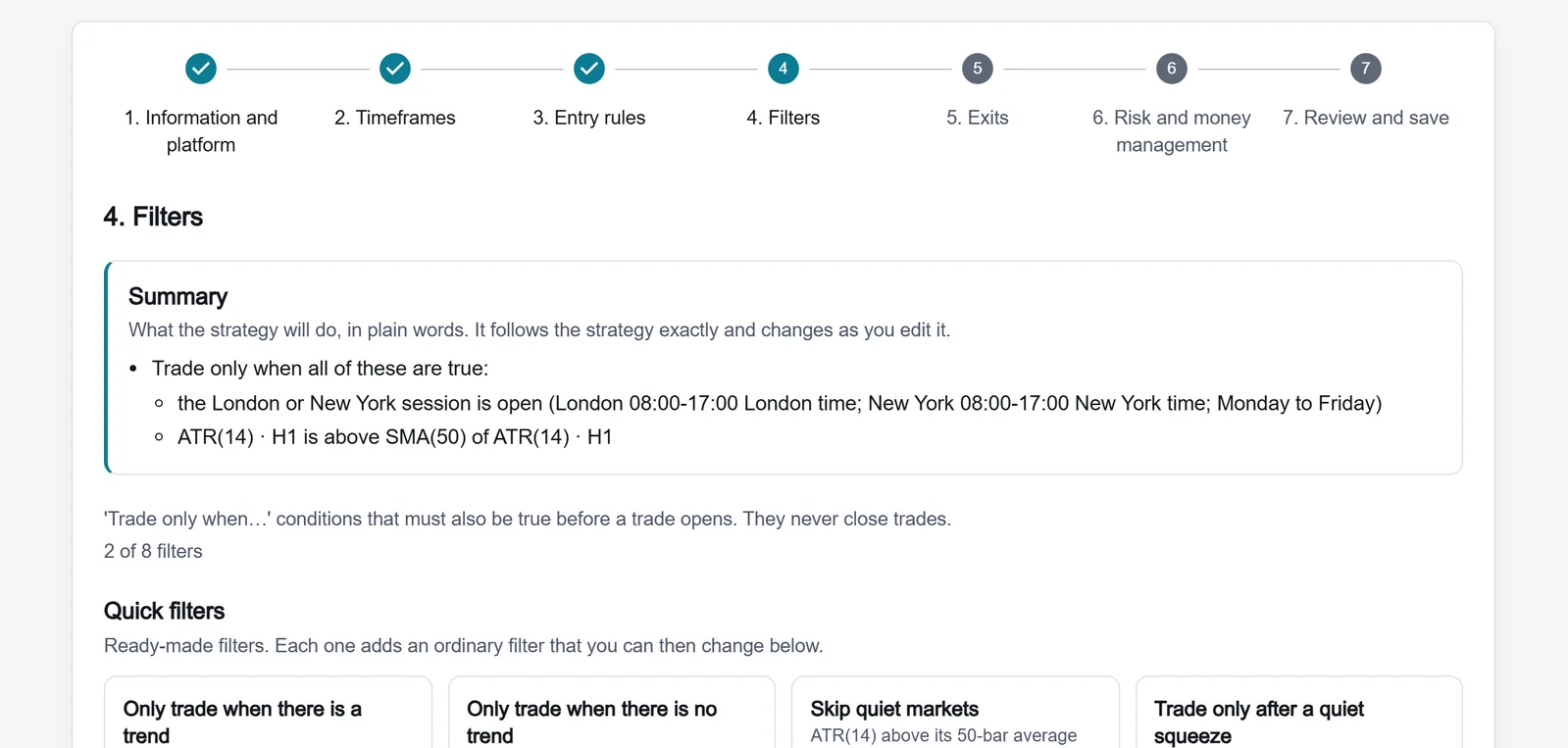
Step 4 shows both filters in the summary: the session, and ATR(14) · H1 above SMA(50) of ATR(14). The spread limit is not on every plan, and the public demo shown here has none.
RSI settings in the builder: Length 2 to 200 (default 14), Overbought level 50 to 100 (default 70), Oversold level 0 to 50 (default 30), Price close by default. The rule "crosses above" is true only on the bar where RSI passes the level. More RSI rules: RSI overbought/oversold EA, no code and the RSI indicator.
A trend version. Keep Steps 4 to 7 and change Step 3 to a moving-average cross, for example EMA(20) crosses above EMA(50): see the MA crossover recipe.
If you prefer to describe the idea in a sentence, Tactix Studio fills the same form: it never writes code, you see every change and save it yourself. More on the form: MT5 EA builder.
What the Generated MQL5 Looks Like
The code generators are fixed programs with no AI model inside: the same strategy document and the same generator release always produce the same file, byte for byte. Every generated file names the generator version in its header. The lines below are copied unchanged from the .mq5 file the generator writes for one of our golden test strategies, "Relative spread", by generator version 1.0.0. It has the same ATR filter as the gold recipe and risks 1 % of equity per trade; // … marks where we skipped lines.
//| AlfaTactix Strategy Builder v2 - MQL5 Expert Advisor
//| Strategy: Relative spread
// …
//| generator version: 1.0.0
// …
    g_sym.tick_size = SymbolInfoDouble(_Symbol, SYMBOL_TRADE_TICK_SIZE);
    g_sym.tick_value = SymbolInfoDouble(_Symbol, SYMBOL_TRADE_TICK_VALUE);
    g_sym.contract_size = SymbolInfoDouble(_Symbol, SYMBOL_TRADE_CONTRACT_SIZE);
    g_sym.volume_min = g_state.volume_min;
    g_sym.volume_step = g_state.volume_step;
    g_sym.volume_max = g_state.volume_max;
    g_sym.stops_level_points = (double)g_state.stops_level_points;
// …
    if(side == ATV2_LONG) // risk_percent
    {
        double risk_cash = equity * 1.0 / 100.0; // base = equity
        if(stop_distance == ATV2_NONE || stop_distance <= 0.0)
            return 0.0; // the risk types need a positive stop distance
        raw = risk_cash / ((stop_distance / g_sym.tick_size) * g_sym.tick_value);
        return ATV2_Fit(raw);
    }
// …
// fit a volume to the symbol: rounded down to the volume step, capped at the maximum, 0.0 (skipped) below the
// minimum or at 0
// …
    g_r_ov2 = ATV2_SerAt(g_atr_1.out_atr, 0); // atr_1.atr
    ATV2_SerPush(g_r_or2, g_r_ov2);
    g_r_ov3 = ATV2_SmaOf(g_r_or2, 50); // SMA(50) of operand 2
// …
    // /filters/items/3/when: cmp
    g_r_n1 = g_r_ov2 != ATV2_NONE && g_r_ov3 != ATV2_NONE && g_r_ov2 > g_r_ov3;
What this shows:
- The EA reads tick size, tick value, contract size, the volume limits and the stop level from the broker when it starts; nothing is hard-coded.
- The lot is the formula above: 1 % of equity ÷ (stop distance ÷ tick size × tick value), then rounded down to the volume step and skipped below the minimum.
- The ATR filter is ATR above its 50-bar SMA, the same as Skip quiet markets.
- The generated code uses no platform indicator built-ins: every indicator, the ATR included, is written out in the code you download, so you can read it.
- All 29 golden Expert Advisors compile in MetaEditor with 0 errors and 0 warnings.
How we check the generators: How we test and MQL5 and Pine generators.
Backtest on Your Own XAUUSD Data
In Step 7, Backtest this strategy opens the AlfaTactix backtest, which tests the same rules on the site with your own data. Set it up with the costs of the account you will trade:
- Costs: the spread, the commission, the slippage in points, and the swap. For metals the triple-swap day is set to Wednesday automatically; change it if your broker uses another day.
- Mode: "Bars only", "1-minute data inside each bar" (like MT5's "1 minute OHLC") or "Real ticks" (like "Every tick based on real ticks").
- Length: a run can use any timeframe down to one minute; how many days one run covers depends on your plan (Pricing).
How the engine compares with the MetaTrader 5 tester, and its limits: Backtest engine.
A backtest is hypothetical: it uses past prices and perfect rules. Past results don't predict future results.
Test in the MT5 Strategy Tester
Before a demo run, test the downloaded EA in MetaTrader 5:
- Copy the
.mq5file toMQL5/Expertsand compile it in MetaEditor (F7). - In the Strategy Tester choose your broker's exact gold symbol (XAUUSD, GOLD or a name with a suffix), H1, and your deposit currency.
- Use Every tick based on real ticks when the broker has tick history. The help page on real and generated ticks (opens in a new tab) [6] explains each mode.
- Check the Journal for 10016 (stops) and 10014 (volume) errors before you read any result.
- Run the same settings on a demo account and compare its spreads and fills with the test.
Full walkthrough: Backtest an EA in the Strategy Tester.
Tune the Gold RSI Recipe After the First Test
Change one setting at a time and test each change on a second stretch of data, so you know which change did what.
| What you see | Likely cause | What to change in the builder |
|---|---|---|
| Trade after trade while RSI stays low | The rule uses is at or below 30, which is true on every bar inside the zone | Use crosses above, or put both in an All of these group: RSI is at or below 30 and crosses above its oversold level |
| Losses against a strong trend | RSI can stay overbought or oversold for hours while gold trends | Stricter levels (75 and 25), or a trend condition such as EMA(20) above EMA(50), or a higher timeframe in Step 2 |
| Signals come late | Length 14 reacts slowly to fast gold moves | Try a Length of 9 to 11 |
| Stops hit by ordinary noise | The ATR multiple is too small for the hour | Start near 1.5 to 2 × ATR, still beyond the stop level |
| Entries in thin hours | When any of them is open trades either session | Only when all are open at the same time keeps only the London and New York overlap |
Get the plain 30/70 crossing working first; stacking every condition on day one makes a test impossible to read.
On a funded account. Check that the firm allows XAUUSD and what lot limits it sets, put Step 6's Daily loss limit and Maximum drawdown below the firm's limits, and test with the spread of your account type. If the firm restricts trading around news, its rules say which hours to avoid: Prop firm rules for an EA.
If You Code It Yourself
A hand-written lot function that follows the procedure above:
// Lots that lose about riskMoney (account currency) if price moves stopDistance (price units) against the trade
double LotsForRisk(const double riskMoney, const double stopDistance)
{
   double tickSize  = SymbolInfoDouble(_Symbol, SYMBOL_TRADE_TICK_SIZE);
   double tickValue = SymbolInfoDouble(_Symbol, SYMBOL_TRADE_TICK_VALUE);
   double volStep   = SymbolInfoDouble(_Symbol, SYMBOL_VOLUME_STEP);
   double volMin    = SymbolInfoDouble(_Symbol, SYMBOL_VOLUME_MIN);
   double volMax    = SymbolInfoDouble(_Symbol, SYMBOL_VOLUME_MAX);
   if(tickSize <= 0.0 || tickValue <= 0.0 || volStep <= 0.0 || stopDistance <= 0.0)
      return 0.0;
   double lossPerLot = stopDistance / tickSize * tickValue;          // money lost by 1.0 lot at the stop
   double lots = MathFloor(riskMoney / lossPerLot / volStep) * volStep; // rounded down to the step
   if(lots < volMin)
      return 0.0;                                                   // too small: skip the trade
   return MathMin(lots, volMax);
}
To check the result, OrderCalcProfit() [7] returns the profit or loss of a given volume between two prices in the account currency. If you compute the ATR yourself, iATR() [8] returns a handle to the platform's ATR. Return codes such as 10016 and 10014 are listed under trade return codes (opens in a new tab) [9]. The whole language is in the MQL5 Reference [10].
Troubleshooting
| Problem | Likely cause | Fix |
|---|---|---|
| 10016 invalid stops | Stop or target inside the stop level | Read SYMBOL_TRADE_STOPS_LEVEL; widen the stop (10016 guide) |
| 10014 invalid volume | Lot not a multiple of the volume step | Round down to SYMBOL_VOLUME_STEP |
| 10019 not enough money | The margin of the lot is above the free margin | Size from the stop and risk; check the margin before sending |
| 10018 market closed | The daily break or the weekend | Trade only inside the symbol's sessions |
| Zero trades in a test | A spread limit below the spread of the data | Compare the limit with the data's spread |
More errors: Common MQL5 EA errors.
A well-known rule with gold in its history. Gold was among the markets the trainees of the channel breakout 20/10 traded in the 1980s, and our library file for it is set up for metals. No source says the rule was made for gold. It needs the Trader plan or higher. Its history and rules.
Next Steps
- Learn: EA risk management and the ATR indicator.
- Build: the recipe above in the Strategy Builder demo.
- Test: Backtest in the Strategy Tester.
- Short timeframes: Scalping EA for MT5 for the cost checks of M1 to M15.
- Funded accounts: Prop firm rules for an EA.
- TradingView: build these rules for Pine Script v6: Gold RSI strategy in Pine, no code.
References: SymbolInfoDouble [1], symbol properties [2], Market Watch [3], SymbolInfoInteger [4], SymbolInfoSessionTrade [5], Real and Generated Ticks [6], OrderCalcProfit [7], iATR [8], trade return codes [9], MQL5 Reference [10].