No-Code Pine Script Builders Compared (2026)

Pine Editor, Pineify, GetPineScript, PineGen AI and AlfaTactix's TradingView form compared by price, output, AI and learning curve, with a beginner checklist.

📖 13 min read

📝 2,554 words

🏷️ Pine Script and TradingView

Share this article:

No-Code Pine Script Builders Compared (2026): Pineify, GetPineScript, Pine Editor and AlfaTactix

Which no-code Pine builder fits which job?

Short answer: there is no single best no-code Pine Script builder, so pick by job. Pineify's visual editor has the widest indicator menu (235+) plus an AI agent [1]; GetPineScript builds strategies or indicators from 40+ indicators with deterministic templates for a one-time $99 [2]; TradingView's own Pine Editor is the code baseline where every script ends up [3]; and the AlfaTactix TradingView form turns a short set of structured rules into a Pine Script v6 strategy() script you own.

As of September 2026. Every price and limit below was checked on the vendor's own page on 27 September 2026; the numbers in brackets point to the sources at the end of the page. No tool here guarantees a profitable strategy, and none replaces testing in TradingView.

Disclosure: Published by AlfaTactix, which makes one of the tools compared here. We describe the other tools from their official pages, use no third-party ratings or reviews, and state where AlfaTactix is weaker.

The tools compared: TradingView's Pine Editor, Pineify (visual editor and AI agent), GetPineScript, PineGen AI, general chat assistants such as ChatGPT, and the TradingView form of the AlfaTactix Strategy Builder. AI prompt tools get one row each here; they are compared in depth in AI Pine Script generators compared (2026).

Related guides: Pine Editor vs Strategy Builder · Build a Pine strategy without coding · When to use MQL5 vs Pine · MT5 twin: Best MT5 EA Builder for Beginners


How did we compare the builders?

We used seven criteria that matter once a script has to run on a real chart, and took every fact from the vendor's own pages.

  • Price model: free tier, one-time licence or subscription, as listed on the vendor's site in September 2026.
  • Output: the Pine Script version, and whether you get a strategy() script, which places simulated orders the Strategy Tester can evaluate, or an indicator() script, which plots and alerts but does not trade [4].
  • No-code model: menus, templates, a structured form or a prompt.
  • AI: whether AI writes the code, fills a form or is absent.
  • Code and export: what you get out, and what the vendor says about ownership.
  • Testing: where you test the result. For every tool here, the final check is TradingView's Strategy Tester [4].
  • Learning curve: judged from how each vendor describes its own workflow, not from our ratings.

We did not score or rank the tools. A builder that suits a discretionary trader who wants alert indicators can be the wrong one for someone who wants a strategy to test.


How do the no-code Pine builders compare?

The biggest differences are the size of the indicator menu, whether AI writes the code, and whether you pay once or keep paying.

ToolPrice model (Sep 2026)OutputNo-code modelAICode / exportTestingLearning curve
Pine Editor (TradingView)Comes with TradingView [5]Pine Script v6, the current version [3]; any script typeNone: you write the codeNo generator described in the docs [3]Your script, in your TradingView accountStrategy Tester [4]Highest: you learn Pine
PineifyLifetime Plus $99, Advanced $149, Expert $259 (500 / 1,000 / 2,500 AI credits a month); "moving to annual subscriptions soon"; no free plan shown [1]Indicators and strategies; version not stated on the home page; also MQL4/MQL5, cTrader, NinjaScript, thinkScript [1]Visual editor with "235+ technical indicators" [1]AI coding agent with automatic syntax-error fixing [1]Exported code; no ownership wording on the home pageNot described on the home page: test in TradingViewLow to medium
GetPineScript$99 one-time, lifetime; trial of two scripts [2]Pine Script v6 strategy or indicator, TradingView only [2]Pick triggers, confluence and exits from 40+ indicators [2]Mostly deterministic templates; AI only to combine conditions [2]Generated script; no ownership wording on the pageTradingViewLow
PineGen AIBasic free (5 credits a month); Pro 50 and Business 200 credits, amounts not on the plan cards [6]Pine Script v6 strategies [7]A promptCode checked against the TradingView v6 compiler before you see it [7]Generated script; no ownership wording on the pageIn-app chart preview and backtest summary [7], then TradingViewLow to start; you still review code
ChatGPT, Claude, GeminiThe vendor's own chat plansPine text you paste; the version is not guaranteedA promptYesYours, but uncheckedTradingViewLooks low; you do the debugging
AlfaTactix TradingView formFree Starter with a 7-day Dual Export trial; TradingView plan €19/month or €190/year (pricing)Pine Script v6 strategy() script onlySix-step form: definition, timeframe, signals, market filters, risk, previewTactix Studio drafts the form (trial and paid plans); no AI writes the codeA Pine v6 script you own (Terms, section 8.2)Strategy Tester in TradingView; no backtest in AlfaTactixLow: fields, not code

Prices change often; check the linked source before you buy. Where a vendor page showed no figure, the table says so. Other tools that appeared in September 2026 search results, such as Draw Pine and Pinetrader, are not in the table because we have not yet verified their facts on their own pages.


The model decides what you check before you trust a script: a menu of choices, a template, a form or the code itself.

  • Visual editors with large menus (Pineify's visual editor). You combine indicators and conditions from a very large menu [1]. The strength is breadth: if an indicator exists, it is probably there. The cost is that more combinations mean more to check, and the menu does not tell you whether a combination makes sense.
  • Deterministic templates (GetPineScript). The same choices produce the same code every time. GetPineScript describes itself as "not an AI code dump" and uses AI only to combine indicator conditions [2]. The strength is predictability; the limit is the shape of the templates.
  • Structured forms (AlfaTactix). A fixed six-step form: one timeframe, signals, market filters and risk. It offers the fewest choices of the three, but every rule is a named field, and a change is a field edit followed by a new export.
  • Prompts (PineGen AI, Pineify's agent, ChatGPT). The most freedom: a prompt can ask for logic no menu contains. The price is that you read code to check it. A compile check catches the errors that stop a script, not the ones that change what it does; AI Pine Script generators compared explains the difference.

Whatever the model, the end point is the same: the script runs inside TradingView, and only a strategy() script produces Strategy Tester results [4].


What is the best Pine builder for a beginner?

A beginner usually does best with a tool that exports a strategy() script, shows every rule before code exists and ends in TradingView's Strategy Tester; learn the Pine Editor alongside it, not first.

Beginner checklist

Use these five checks on any builder, including ours.

  1. Clear steps. Can you say, in one sentence per rule, what the script will do?
  2. A testable output. Does it export a strategy() script, not only an indicator? An indicator can alert you, but it cannot give you Strategy Tester results [4].
  3. Limits stated up front. Does the vendor say which indicators, timeframes and filters it supports? A builder that promises "anything" leaves you to find the gaps in the Tester.
  4. A path to the Tester. Can you add the script in the Pine Editor [5] and run it with commission and slippage set? See Pine commission, slippage and capital.
  5. AI as help, not a black box. If AI is involved, can you see and edit what it produced before it trades?
  1. Build one simple rule set in the Strategy Builder demo (no signup; Tactix Guide explains each step), or in any builder that passes the checklist.
  2. Follow the first moving-average strategy walkthrough.
  3. Add the script in the Pine Editor: Pine Editor setup.
  4. Test it in the Strategy Tester with realistic costs.

What to skip early

  • Invite-only "miracle" scripts. You can't read or test their logic: why copied Pine scripts fail.
  • A complete trading bot from one chatbot prompt. Chat models often write older Pine under a v6 header: ChatGPT Pine v6 guide.
  • Multi-timeframe ideas in your first week. They add repainting traps (repainting and lookahead). The AlfaTactix form uses one timeframe per strategy on paid plans today; multi-timeframe logic is in development.

A first-week plan

DayTask
1–2Build a moving-average crossover or an RSI overbought/oversold strategy
3Set commission and slippage, then run the Strategy Tester
4Add one market filter, such as a trading session
5Test a few values of one parameter (10 variations in a day) and note how much the results move

If raw Pine feels hard at this point, that is normal: why learning Pine is hard.


Where does AlfaTactix fit?

AlfaTactix fits traders who already know their rules, want each rule visible as a field, and want a Pine v6 strategy they own.

  • Separate forms. The TradingView form writes Pine Script v6; the MetaTrader 5 form writes an MQL5 Expert Advisor. A strategy built in one form is not generated in the other. The TradingView plan exports Pine only; the Dual Export plan (€49/month) gives you both forms, and you build each strategy in the form for its platform.
  • What the form covers. Signals use the market's most-used indicators, among them RSI, SMA, EMA, WMA, MACD, Stochastic, Bollinger Bands, ATR and OBV. Market filters cover trading sessions, time windows (weekdays and hours), ATR volatility and liquidity (spread and volume). Paid plans use one timeframe per strategy; multi-timeframe logic is in development.
  • AI. Tactix Studio drafts the form from a plain-language description, using only the supported indicators and filters; it writes no Pine itself. Code Generator writes the script from the form. Tactix Studio is in the 7-day Dual Export trial and the paid plans; the free demo has Tactix Guide.
  • Code ownership. The AlfaTactix Terms (section 8.2) state: "You own the code generated from your strategies and may use it for any purpose" (Terms).
  • Price. Starter is free and includes a 7-day Dual Export trial (up to 2 strategies). The TradingView plan costs €19/month or €190/year (pricing).
  • Testing. AlfaTactix does not backtest, optimise or trade. You test the exported script in TradingView's Strategy Tester.

Where is AlfaTactix weaker?

It offers fewer choices than the other builders here, and it stops at the script.

  • Fewer indicators. GetPineScript lists 40+ [2] and Pineify's visual editor 235+ [1]; the AlfaTactix form has a shorter list of widely used indicators. SuperTrend, ADX, Ichimoku and VWAP, for example, are not in it.
  • Strategies only. It exports strategy() scripts, not indicator() scripts for plots or alert-only tools. GetPineScript [2] and Pineify [1] do both.
  • No preview or backtest of its own. PineGen AI shows an in-app chart preview and backtest summary [7]; AlfaTactix leaves all testing to TradingView.
  • One timeframe per strategy on paid plans; multi-timeframe logic is in development, with no date.
  • Pine only from this form. No conversion to MQL5 or other languages; Pineify's agent covers six language families [1].
  • A fixed form. Logic the form can't express needs editing in the Pine Editor after export.
  • A young brand. No third-party reviews yet, and AlfaTactix did not appear in the "best no-code Pine builder" search results we checked in September 2026.

Who should choose which?

Choose by what you need to check yourself, not by the fastest demo.

  • Pine Editor: traders willing to learn Pine, who need any script type, or who want to adjust a script exported from any builder.
  • Pineify: traders who want the largest indicator menu plus an AI agent, possibly for several platforms. Check the licence before buying: the vendor says lifetime plans are moving to annual subscriptions [1].
  • GetPineScript: traders who want a one-time price, predictable templates, both strategies and indicators, and indicators such as SuperTrend or ADX [2].
  • PineGen AI: traders who prefer prompts and want a compiler check and chart preview before leaving the app; the free Basic plan is a low-cost way to try it [6] [7].
  • ChatGPT, Claude or Gemini: learners who want Pine explained and errors translated, not a finished strategy. See the ChatGPT Pine v6 guide.
  • AlfaTactix TradingView form: traders whose rules fit the supported indicators and filters, who want a strategy() script with every rule visible as a field and code they own. Traders on both MT5 and TradingView can use the Dual Export plan, building each strategy in its own form.

Where AlfaTactix Fits: A Form That Exports Pine Script v6

The AlfaTactix TradingView form is the structured option in this comparison. You set one timeframe, entry and exit signals from the market’s most-used indicators, market filters and risk, and Code Generator writes a Pine Script v6 `strategy()` script. Every rule stays visible as a field, so changing a period or a filter is a field edit and a new export, not a code hunt.

If you would rather describe the idea in a sentence, Tactix Studio drafts the same form for you from the supported indicators and filters; you review every field before exporting. Tactix Studio is included in the 7-day Dual Export trial and in the paid plans.

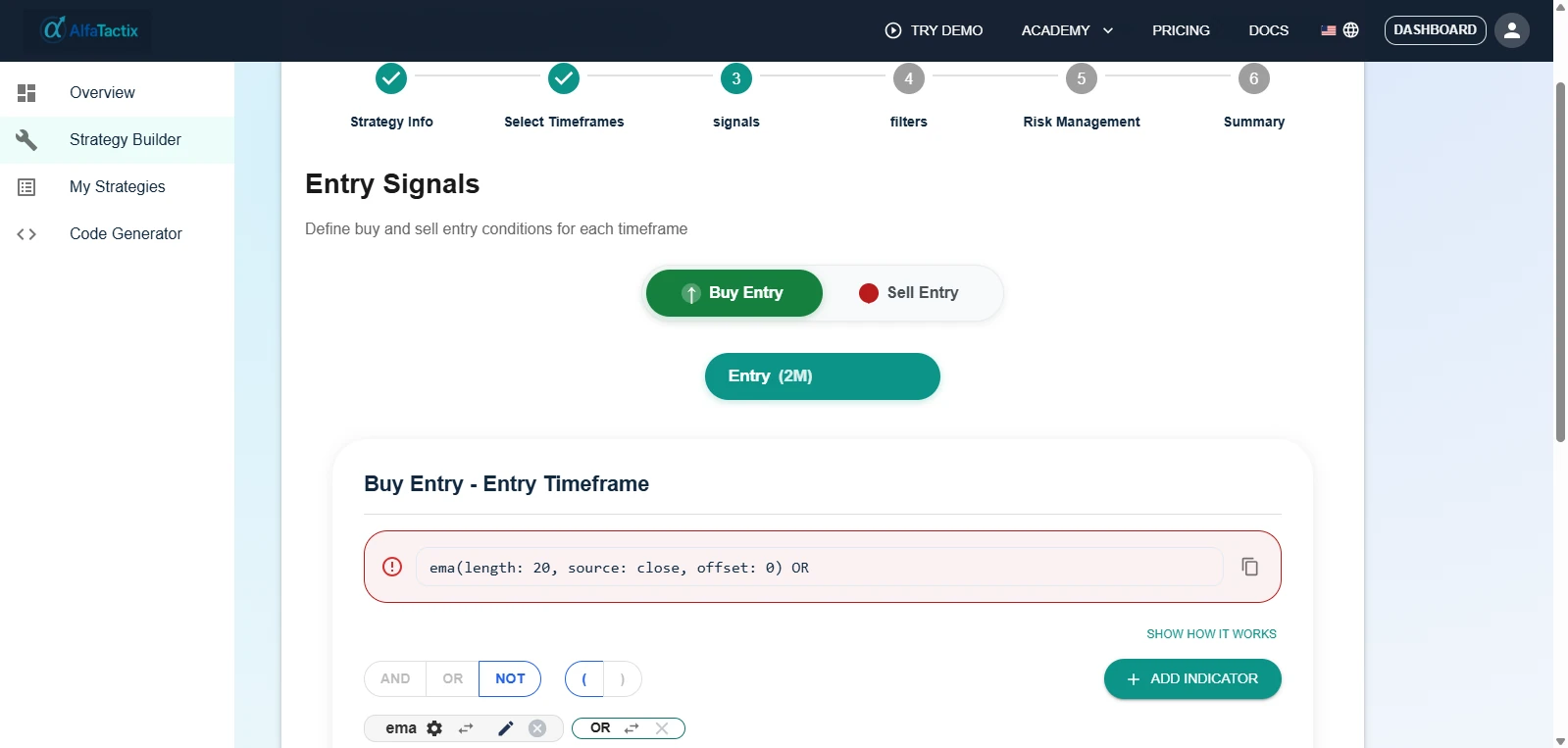
AlfaTactix Strategy Builder, Step 3 Signals: entry conditions set in the form before Pine Script v6 export
The Strategy Builder form: Step 3, entry signals. The TradingView form exports Pine Script v6.

To judge the form before signing up, open the demo. There, Tactix Guide explains each step while you build one rule set by hand.

Next steps


Frequently Asked Questions

There is no single best one; it depends on the job. As of September 2026, Pineify has the largest indicator menu (235+) plus an AI agent, GetPineScript builds strategies or indicators from 40+ indicators for a one-time $99, PineGen AI turns prompts into compiler-checked Pine v6, and the AlfaTactix TradingView form turns structured rules into a Pine v6 strategy you own. AlfaTactix publishes this page.

Partly. As of September 2026, PineGen AI has a free Basic plan with 5 credits a month, GetPineScript offers a trial of two scripts, and AlfaTactix has a free Starter plan with a 7-day Dual Export trial (up to 2 strategies) plus a no-signup demo. Pineify’s home page shows paid lifetime plans only. TradingView’s own Pine Editor comes with TradingView, but you write the code yourself.

Usually one that exports a strategy() script, shows every rule before any code exists and ends in TradingView’s Strategy Tester. Use the five-point beginner checklist on this page to judge any tool, and learn Pine Editor basics alongside it, not first. See also Pine Editor vs Strategy Builder.

Yes. The TradingView form exports a Pine Script v6 strategy() script, which you add in TradingView’s Pine Editor and test in the Strategy Tester. AlfaTactix does not backtest it for you. The Terms (section 8.2) say: “You own the code generated from your strategies and may use it for any purpose.”

No. The TradingView form and the MetaTrader 5 form are separate: the TradingView form writes Pine Script v6 and the MT5 form writes an MQL5 Expert Advisor. A strategy built in one form is not generated in the other. The Dual Export plan gives you both forms, and you build each strategy in the form for its platform. See When to use MQL5 vs Pine.

Use the Pine Editor if you want to learn Pine or need logic no builder offers; every script ends up there anyway. Use a builder if you want a testable strategy sooner and your rules fit its menu or form. Many traders do both: build, export, then read and adjust the code in the Editor. Details: Pine Editor vs Strategy Builder.

References

  1. Pineify. Pine Script AI, Finance Agent & AI Trading Toolkit. https://pineify.app/
  2. GetPineScript. Pine Script Generator for TradingView | GetPineScript. https://getpinescript.com/
  3. TradingView. Welcome to Pine Script® v6. https://www.tradingview.com/pine-script-docs/welcome
  4. TradingView. Strategies. https://www.tradingview.com/pine-script-docs/concepts/strategies
  5. TradingView. First steps. https://www.tradingview.com/pine-script-docs/primer/first-steps
  6. PineGen AI. PineGen AI pricing. https://www.pinegen.ai/pricing
  7. PineGen AI. Pine Script AI Generator for TradingView | PineGen AI. https://www.pinegen.ai/

AlfaTactix is a no-code strategy builder for MetaTrader 5 (MQL5) and TradingView (Pine Script) traders who design and manage rule-based strategies.

Trading involves substantial risk of loss. AlfaTactix generates code from the rules you define and does not provide financial advice. Past or backtested performance does not guarantee future results.

© 2026 AlfaTactix. All rights reserved.