

AI EA Generators Compared (2026): MetaEditor AI Assistant, ChatGPT, Pineify, EA Builder Pro and Visual Builders
Which AI tool should you use to build an MT5 EA?
Short answer: if you can read MQL5, start with the free MetaEditor AI Assistant, which writes code inside the editor where you compile it [1]; if you can't, use a tool that keeps your rules visible before any code exists, such as a form or rule builder, and use ChatGPT or Claude as a tutor rather than the author.
As of September 2026. Every price and limit below was checked on the vendor's own page on 27 September 2026; the numbers in brackets point to the sources at the end of the page. No tool here guarantees a profitable or live-safe EA.
Disclosure: Published by AlfaTactix, which makes Tactix Studio, one of the tools compared here. We describe the other tools from their official pages and don't claim any tool is best for everyone.
The six tools compared: general chat assistants (ChatGPT, Claude, Gemini), the MetaEditor AI Assistant, Pineify's MQL5 agent, EA Builder Pro's AI Agent, StrategyQuant X with its Q AI chat, and AlfaTactix's Tactix Studio.
Related guides: Can ChatGPT Write an MT5 EA? (prompt template and common bugs) · MT5 EA builders compared: fxDreema vs EA Builder vs StrategyQuant X (non-AI builders) · Best MT5 EA Builder for Beginners
What changed in 2026?
MetaEditor now has its own AI Assistant, so "can AI write my MT5 EA?" has an official answer.
MetaTrader 5 build 6060, released on 23 July 2026, added an AI Assistant to MetaEditor. It generates new MQL5 programs, analyses existing code, detects errors and suggests fixes, explains algorithms and helps with refactoring [1]. Signing in with an MQL5.community account gives you the free MQL5 Lite plan, and you can use your own key from OpenAI, Anthropic, Gemini, DeepSeek, Ollama or other supported providers. The same build added Model Context Protocol (MCP) support, so external agents such as OpenAI Codex and Claude Code can connect [1].
The MetaEditor help page describes two jobs: write a trading idea in natural language and get an MQL5 implementation, or have existing code explained. It says the assistant is "currently free" and that payment options will come later [2]. Neither page describes automatic compiling or testing of the generated code, so that part stays with you.
This matters because most "best AI EA generator" lists were written before July 2026. A June 2026 ranking published by Pineify, for example, lists Pineify, EA Builder Pro, fxDreema, EA Studio, StrategyQuant X and RoboQuant, and does not include the MetaEditor AI Assistant [3].
How do AI EA generators compare?
The real difference is what the AI produces (code, generated strategies or a form) and who checks it before it trades.
We compared five criteria from each vendor's own pages: input (what you give the tool), output (what you get back), validation (what checks the output before you trade it), where the code lives and price model. We used no third-party ratings or reviews.
| Tool | Input | Output | Validation | Where the code lives | Price model (Sep 2026) |
|---|---|---|---|---|---|
| ChatGPT, Claude, Gemini | A prompt in a chat | MQL5 text you copy out | None for MQL5: you compile in MetaEditor; forum users report MQL4/MQL5 mix-ups [4] | In the chat thread until you paste it into MetaEditor | The vendor's own chat plans; nothing MQL5-specific |
| MetaEditor AI Assistant | A prompt inside MetaEditor | MQL5 code; also explanations and suggested fixes [1] | You compile and test; no automatic testing described [2] | Your MetaEditor project | Free MQL5 Lite plan on sign-in; "currently free", paid options later [2]; or your own API key |
| Pineify MQL5 agent | A prompt, plus a visual editor | MQL5; also Pine Script, MQL4, cTrader C#, NinjaScript, thinkScript [5] | Vendor says the agent checks the code against the MetaEditor compiler and fixes errors until it compiles [3] | Your Pineify account, then exported; ownership wording not on the home page | Lifetime: Plus $99, Advanced $149, Expert $259 (500 / 1,000 / 2,500 AI credits a month); vendor says it is moving to annual subscriptions [5] |
| EA Builder Pro AI Agent | A plain-language description, templates, a visual editor | An EA as MQL source or compiled EX [6] | Not described on the home page: test in the MT5 Strategy Tester | In EA Builder Pro, exported as source or compiled file | Free plan, no card; paid plans raise limits, prices not on the home page [6] |
| StrategyQuant X (Q AI) | Generation settings; Q AI chat | Generated strategies, exported as full source for MT4/MT5 and other platforms [7] | Built-in backtests and robustness tests [7] | Your desktop project, then exported | $1,290–$2,900 one-time or 12 × $129–$290; 14-day trial; 2,400–12,000 AI credits [8] |
| Tactix Studio (AlfaTactix) | A plain-language description | A draft of the Strategy Builder form, not code; Code Generator then writes the .mq5 | You review every field in the form; compile in MetaEditor, test in the MT5 Strategy Tester [9] | An .mq5 file you download and own (Terms) | 7-day Dual Export trial, then paid plans; MetaTrader plan €29/month (pricing) |
Prices change often; check the linked source before you buy. Where a vendor page showed no figure, the table says so.
MetaEditor AI Assistant vs ChatGPT: which is better for MQL5?
For MQL5 work, the MetaEditor AI Assistant has the practical edge, because it sits where the code is compiled; ChatGPT and Claude remain useful as tutors.
Both run on large language models, and the assistant can even use your own OpenAI or Anthropic key [1]. The differences are about workflow:
| Criterion | MetaEditor AI Assistant | ChatGPT / Claude in a browser |
|---|---|---|
| Where you ask | Inside MetaEditor | In a separate chat |
| Existing code | Analyses and explains existing code [1] | Only what you paste in |
| Compile loop | Same window as the compiler | Copy, paste, compile, paste the error back |
| Price (Sep 2026) | Free MQL5 Lite plan [1] | The vendor's own plans |
| Testing | Neither tests your EA; you do | Same |
The weaknesses reported for chat-written MQL5 are old and well documented. In a 2023 MQL5 forum thread, experienced members listed MQL4 functions called in MQL5 code, duplicated OnTick handlers and similar errors [4]. A 2023 MQL5 article on ChatGPT for MQL4 and MQL5 development advised always double-checking generated code and splitting work into small blocks [10]. A 2026 community test on the MQL5 blogs walks through a ChatGPT-written EA and the fixes it needed [11]. A built-in assistant shortens the loop; it does not remove the need to read and test the result.
The step-by-step prompt workflow and the most common bugs are in Can ChatGPT Write an MT5 EA?; this page does not repeat them.
Prompt-to-code vs prompt-to-form: why does it matter for debugging?
It decides what you have to read when something goes wrong: hundreds of lines of code, or a short list of form fields.
It is 11:40 p.m. on a Friday. An AI gave you 400 lines of MQL5; MetaEditor compiles it and the Strategy Tester shows a smooth curve. By Wednesday the demo account has three trades you don't remember allowing. You search for OrderSend and find two different lot formulas, and the chat that wrote them is buried under a dozen other threads.
Nobody did anything wrong on purpose. The logic was opaque: you approved a block you didn't fully read.
- Prompt-to-code (chat assistants, MetaEditor AI Assistant, Pineify, EA Builder Pro's agent): the AI's understanding of your idea exists only as code. To check it, you read code. The upside is freedom: a prompt can attempt any logic MQL5 can express.
- Prompt-to-strategy (StrategyQuant X): the software generates and tests strategies for you; the job becomes judging robustness rather than reading code.
- Prompt-to-form (Tactix Studio): the AI fills fields such as "RSI(14) crosses above 30" or "trade only in the London session". You check the fields; the deterministic generator writes the code. The limit is the form: only supported indicators and filters can be drafted.
If you will change your rules often (a period here, a filter there), a form or builder usually saves time on day thirty, even when a prompt is faster on day one.
Who should choose each?
Pick by what you can check yourself, not by which demo looks fastest.
- MetaEditor AI Assistant: traders who can read MQL5 and want a free assistant in the editor they already use. It is also the natural tool for editing an EA you exported from any builder.
- ChatGPT, Claude or Gemini: learners who want MQL5 explained, compiler errors translated and single functions refactored, with you as the architect [10].
- Pineify MQL5 agent: traders who want one prompt tool across several languages and value a compile-and-fix loop. Check the licence model before buying: the vendor says lifetime plans are being replaced by annual subscriptions [5].
- EA Builder Pro AI Agent: traders who like templates plus an AI agent, want a free plan to start and want to choose between source and compiled output [6].
- StrategyQuant X: traders who want the software to generate and stress-test strategies and can budget for a desktop licence [8].
- Tactix Studio (AlfaTactix): traders who already know their rules, want to see them as form fields before any code exists, and whose strategy fits the supported indicators and filters. For non-AI builders, see MT5 EA builders compared: fxDreema vs EA Builder vs StrategyQuant X.
Prompt to Form, Not Prompt to Code: Where Tactix Studio Fits
Every other AI tool in this comparison turns a prompt into code or into generated strategies. Tactix Studio turns a one-sentence description into a draft of the Strategy Builder form: timeframe, signals from the market’s most-used indicators, market filters and risk. It drafts only what the form supports, and it writes no MQL5 itself.
You then review each field, change what is wrong and export from Code Generator, which writes the `.mq5` file. The trade-off is plain: less freedom than a prompt that can attempt anything, but every rule is visible and editable before any code exists. Tactix Studio is included in the 7-day Dual Export trial and in the paid plans.
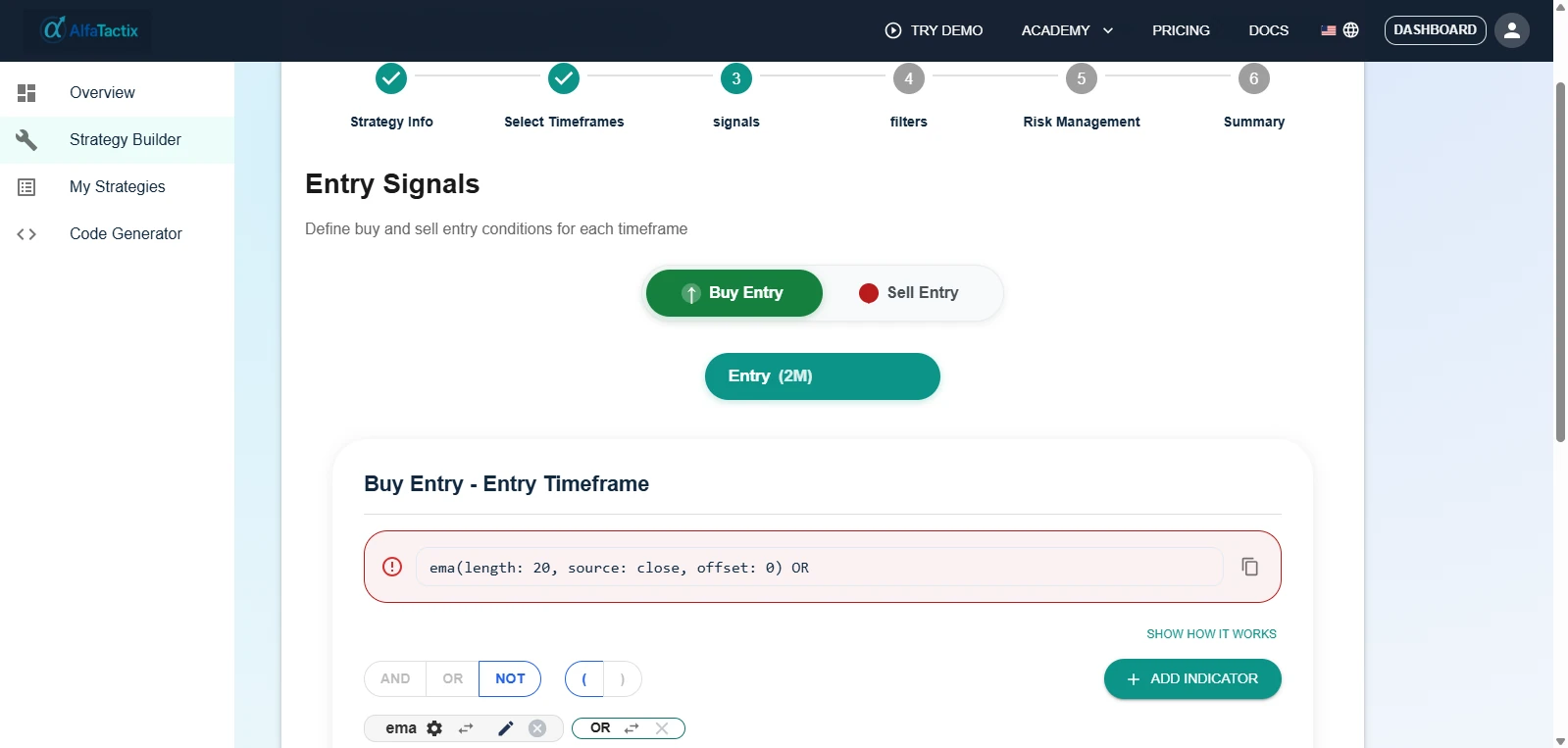
To judge the form itself first, open the demo without signing up. There, Tactix Guide explains each step while you build one rule by hand.
The 15-minute fair test
Give two paths the same simple rules and fifteen minutes each; whichever gets you to "I trust this logic" first is your lead tool.
Test strategy (simple on purpose):
- Buy when the 10-period SMA crosses above the 30-period SMA.
- Sell on the opposite cross.
- Optional filter: buy only when RSI(14) is above 50.
Path A: AI prompt (15 minutes).
- Paste the rules into the MetaEditor AI Assistant or a chat assistant, asking for "an MQL5 EA, one symbol, inputs for both periods".
- Compile. Note the minutes to the first clean compile.
- Highlight every
OrderSendand lot-size line. Can you explain each one?
Path B: form (15 minutes).
- Open the Strategy Builder demo; no account needed. Tactix Guide explains each step.
- Enter the same rules in the signals, filters and risk steps.
- Note the minutes until the form matches your intent.
If you are on the Dual Export trial, repeat Path B by describing the rules to Tactix Studio and time how long it takes to review its draft.
| Metric | Path A: prompt | Path B: form |
|---|---|---|
| Minutes to "I trust the logic" | ? | ? |
| Change the SMA period in under 2 minutes? | ? | ? |
| Where does the RSI filter live? | ? | ? |
Whichever path wins on clarity for you is the right lead tool. Many traders lead with a builder and use AI as the debugger. Then test the winner in the MT5 Strategy Tester [9].
Where is Tactix Studio weaker?
Tactix Studio trades freedom for visibility, and it has clear limits you should know before choosing it.
- It drafts only what the form supports: the market's most-used indicators (RSI, MACD, EMA and Bollinger Bands, for example) and the market filters that exist, such as session, time window, spread and volume, and ATR volatility. A custom indicator, a chart pattern or a news rule cannot be drafted; a prompt-to-code tool will at least attempt it.
- You review every field. The draft is a starting point, not a finished strategy, and nothing replaces your own check.
- It doesn't write MQL5 by itself. Code Generator writes the
.mq5from the form, so you can't ask Tactix Studio to change one line of exported code; the MetaEditor AI Assistant is the better tool for that. - No backtesting, optimisation or strategy generation. Test in the MT5 Strategy Tester; StrategyQuant X generates and tests strategies.
- One timeframe per strategy on the paid plans; multi-timeframe logic is in development.
- Not in the free demo. Tactix Studio is in the 7-day Dual Export trial and the paid plans; the demo has Tactix Guide.
- Separate forms, no MT4. The MT5 form writes MQL5 and the TradingView form writes Pine Script v6; a strategy built in one is not generated in the other. The Pine-side comparison is AI Pine Script generators compared.
- A young brand with no independent reviews yet; the June 2026 ranking cited above does not list AlfaTactix [3].
What you get in return: every rule stays visible and editable before any code exists, and the .mq5 file is yours. The AlfaTactix Terms (section 8.2) state: “You own the code generated from your strategies and may use it for any purpose” (Terms).
Price: Starter is free and includes a 1-week Dual Export trial; the MetaTrader plan is €29/month or €290/year as of September 2026. All plans: pricing. More on Studio and Guide: Tactix AI.
Next steps
| Your situation | Read next |
|---|---|
| You will prompt ChatGPT or Claude | Can ChatGPT Write an MT5 EA? |
| You want to compare non-AI builders | MT5 EA builders compared: fxDreema vs EA Builder vs StrategyQuant X |
| You are choosing a first builder | Best MT5 EA Builder for Beginners |
| You want the free built-in route | MQL5 Wizard vs Strategy Builder |
| Your AI EA fails live | MT5 Error 10016 · Strategy Tester vs Live |
If the form path won your fair test, keep going in the demo and create a free account when you are ready to save and export.