

MQL5 Wizard vs Strategy Builder (2026)
Should you use the MQL5 Wizard or Strategy Builder?
The MQL5 Wizard in MetaEditor is MetaQuotes’ built-in generator: pick Expert Advisor (generate), choose Standard Library signal / trailing / money modules, and get compilable .mq5 in ~30–60 minutes — documented in Creating Expert Advisors in the MQL Wizard and MQL5 Wizard: Creating Expert Advisors without Programming. AlfaTactix Strategy Builder is a guided six-step web workflow (strategy → timeframes → signals → filters → risk → save) that exports MQL5 when you need multi-timeframe separation, market filters, and validated risk before code exists — typically ~1–2 hours to first backtest, faster on iteration. Neither replaces MetaEditor compile (F7); both produce .mq5 you test in Strategy Tester.
Disclosure: Published by AlfaTactix. MQL5 Wizard facts below cite official mql5.com documentation only. For third-party builders (FxDreema, EA Studio, etc.), see Best MT5 No-Code EA Builders Compared.
Related guides: Create/Edit MT5 EA · Build EA Without Coding · Why Learning MQL5 Is Hard · Production-Ready MQL5 Without MetaEditor
What Is the MQL5 Wizard in MetaEditor?
The MQL5 Wizard is a code generator inside MetaEditor (shipped with MetaTrader 5). MetaQuotes describes it in the MQL5 book chapter Creating Expert Advisors in the MQL Wizard:
- It can create an Expert Advisor (template) — empty
OnInit/OnTickskeleton — or Expert Advisor (generate) — a ready-made EA built from the MQL5 Standard Library. - The generate path uses classes in
MQL5/Include/Expert/,Include/Trade,Include/Indicators, and related folders — implementing indicator signals, trade execution from signal combinations, money management, and trailing stops.
The article MQL5 Wizard: Creating Expert Advisors without Programming states that basic strategy classes live under MQL5/Include/Expert/, with ready algorithms in Signal, Trailing, and Money sub-folders. MQL5 Wizard parses those files (when MetaEditor starts) and uses them to generate Expert Advisor source code.
Important: This is not a cloud app — it is native to MetaEditor. You do not “export from a website”; you Finish the Wizard and edit or compile the generated .mq5 locally.
For a beginner walkthrough with symbol/timeframe and signal selection, see MQL5 Wizard for Dummies.
How the MQL5 Wizard Works (Official Workflow)
Below is the workflow MetaQuotes documents — use these steps when comparing speed and limitations.
1. Launch MetaEditor and start the Wizard
Per article 171: click New on the toolbar or File → New (Ctrl+N), then select Expert Advisor (generate).
2. General properties (Step 1)
Enter the EA name and input parameters. The book chapter notes that library-based Expert Advisors require two mandatory inputs: Symbol and TimeFrame — see experts_wizard.
Wizard for Dummies shows choosing EURUSD and M10 for an intraday EA (instead of leaving “current chart” defaults for a universal EA).
3. Trade signal module (Step 2)
Select signal modules from the Standard Library — combinations of standard indicators. Article 287 mentions ~20 ready-made signal modules at the time of that walkthrough.
4. Trailing module (Step 3)
Choose a trailing stop algorithm from Include/Expert/Trailing/ or proceed without trailing (as in the Dummies example).
Custom trailing modules must live under Include/Expert/ with a Wizard class descriptor — How to Create a Module of Trailing. MetaEditor rescans Include/Expert at startup after you add custom modules.
5. Money and risk management (Step 4)
Select money / risk management from Include/Expert/Money/ — e.g. fixed lot vs percent risk (module-dependent).
6. Generate, compile, attach
MetaEditor opens the generated .mq5. Compile (F7) → attach .ex5 from Navigator → enable Algo Trading → run Strategy Tester.
Wizard vs template: Template = you write logic. Generate = Standard Library assembles logic from selected modules — still real MQL5 source, often large and class-heavy.
What AlfaTactix Strategy Builder Does Differently
AlfaTactix Strategy Builder targets the same outcome — a testable MT5 Expert Advisor — but the design surface differs from the Wizard’s module picker:
| Aspect | MQL5 Wizard | AlfaTactix Strategy Builder |
|---|---|---|
| Where it runs | MetaEditor (desktop, with MT5) | Web app → save → Code Generator |
| Logic model | Pre-built Standard Library modules | Per-indicator conditions (Compare, Cross, Golden Cross, MACD crossover, BB Breakout, etc.) — see MA Crossover EA guide |
| Timeframes | EA Symbol + TimeFrame inputs | Step 2 — Timeframes: explicit multi-timeframe tabs before signals |
| Market filters | Not a Wizard step; custom code or modules | Step 4 — Filters: session, spread, ATR, and more — Advanced MTF & Filters |
| Risk | Money module at Wizard end | Step 5 — Risk: SL/TP, lot sizing, trailing — EA Risk Management |
| Validation | At compile time | Real-time validation before export — Build EA Without Coding |
| Iteration | Edit generated library code or re-run Wizard (overwrites) | Change Step 3 rule → re-export → recompile |
Strategy Builder does not replace the Wizard inside MetaEditor — it replaces hand-picking Standard Library modules when your strategy fits rule-based indicators + filters + risk documented in our strategy-specific tutorials.
If you know the rules in words but not which UI fields to pick, Tactix Studio drafts Steps 2–5 from one sentence — then you export structured MQL5 from Code Generator, unlike pasting a ChatGPT draft into MetaEditor.
Skip the Module Picker: Describe the EA to Tactix Studio
The Wizard asks you to pick from Standard Library signal, trailing, and money modules one screen at a time. Strategy Builder replaces that with six explicit steps — but you can skip clicking through those steps cold, too. Tactix Studio reads a plain-language description of your EA and drafts Timeframe, Signals, Filters, and Risk across the form in one pass.
For an idea like "H4 trend filter with H1 RSI entries, 1% risk per trade, no trading during low-liquidity Asian session," Tactix Studio maps that straight to Step 2's multi-timeframe tabs, Step 3 conditions, Step 4 session filter, and Step 5 risk sizing — the exact structure the comparison table below lays out, just pre-filled instead of built field by field.
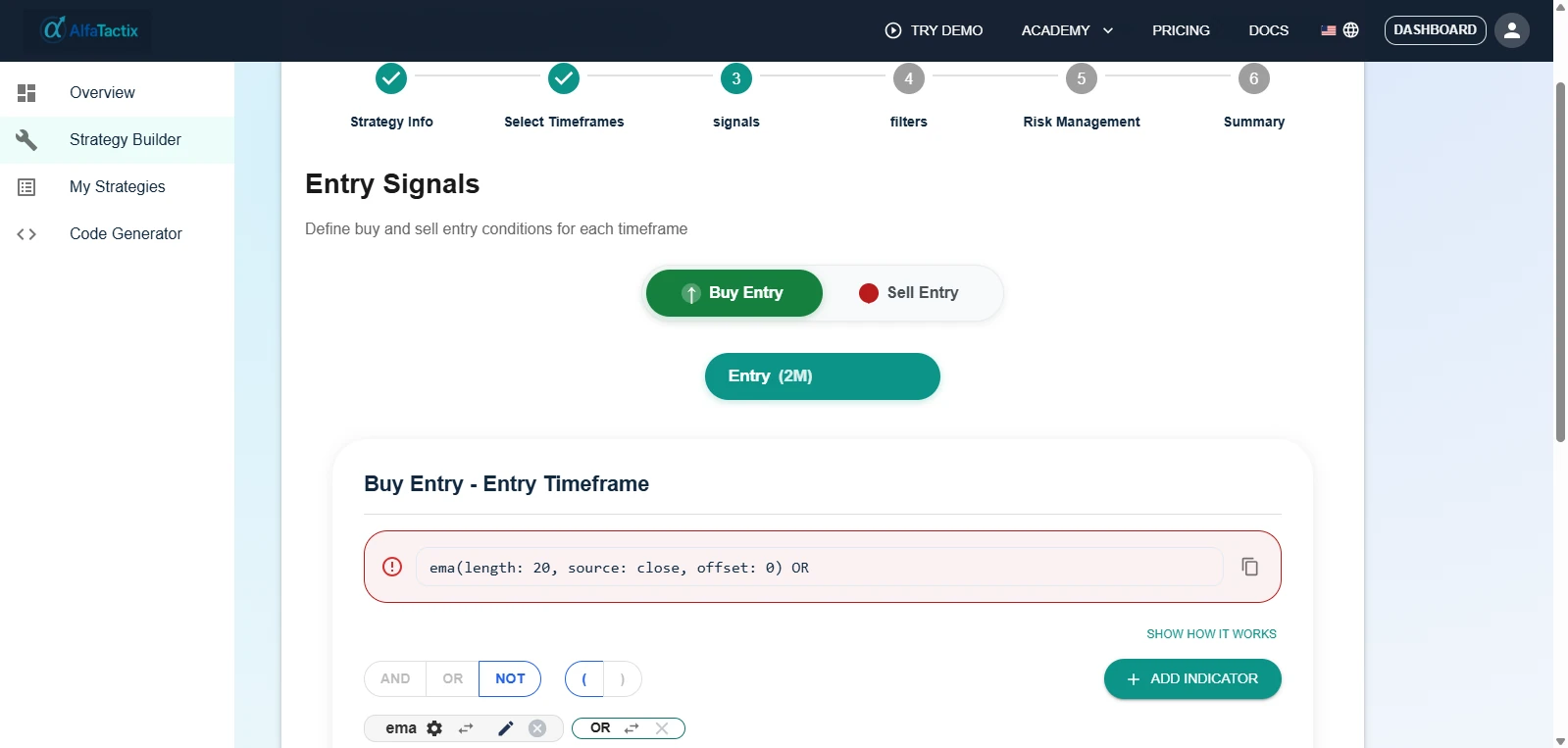
The output is identical either way: a saved strategy that exports real MQL5 through Code Generator and still compiles with MetaEditor F7. Tactix Studio only changes how fast you get from idea to a reviewable draft — every field it fills stays editable before you export.
Side-by-Side Comparison
| Criterion | MQL5 Wizard | AlfaTactix Strategy Builder |
|---|---|---|
| Official docs | mql5.com book + articles | Build EA Without Coding |
| Cost | Free with MT5 | Platform pricing — demo |
| Programming | None to generate; may need MQL5 to extend | None for rule-based strategies |
| Output | .mq5 in MQL5/Experts/ | .mq5 via Code Generator |
| Compile | MetaEditor F7 | MetaEditor F7 |
| Signal source | Standard Library modules | Strategy Builder indicator configs (SMA, RSI, MACD, Bollinger, …) |
| Custom signals | Custom module + descriptor in Include/Expert/ (article 231) | Combine conditions with AND/OR/groups on Step 3 |
| Multi-timeframe | Limited by library / manual code | First-class Step 2 design |
| Prop / session filters | Manual / custom | Step 4 filters + Prop Firm EA Rules patterns |
| Best backtest discipline | Backtest EA guide | Same tester workflow |
| Learning curve | Learn module names + generated structure | Learn six-step schema + indicator fields |
Speed Test: Time to First Backtest
Honest timings for a first-time user with MT5 already installed — your mileage varies.
| Task | MQL5 Wizard | AlfaTactix Strategy Builder |
|---|---|---|
| Install / access | Already in MetaEditor | Account + demo |
| Define entry rules | ~15–25 min — pick 1–2 signal modules (article 287) | ~25–45 min — Step 3 signals (e.g. RSI Cross 30/70) |
| Risk + trailing | ~5–10 min — Wizard Steps 3–4 | ~15–20 min — Step 5 risk |
| Filters (session/spread) | Not in Wizard — often +hours if coding | ~10–20 min — Step 4 |
| Export / compile | ~5 min — already in MetaEditor | ~10 min — export + MetaEditor F7 |
| Total to first tester run | ~30–60 min (simple module EA) | ~1–2 hours (structured strategy with filters) |
| Change one entry rule | Re-run Wizard or edit generated C++-style classes | Edit Step 3 → re-export (~10–20 min) |
| Add higher-TF trend filter | Custom signal module or manual code | Step 2 + Step 3 AND group (~20–40 min) |
Takeaway: The Wizard wins raw time-to-first-test for a single-timeframe, library-module EA. Strategy Builder wins iteration speed when the strategy includes filters, multi-timeframe logic, and separated risk — the structure MetaQuotes’ Wizard does not walk you through step-by-step.
Always validate with Every tick where possible and read Strategy Tester vs Live before Demo/Live.
When to Use the MQL5 Wizard
Choose the official MQL5 Wizard when:
- You already live in MetaTrader 5 + MetaEditor and want zero web tools.
- Your idea maps to a Standard Library signal module (MA, RSI, etc.) documented under
Include/Expert/Signal/— article 171. - You need a prototype today on one symbol and timeframe — e.g. EURUSD M10 in Wizard for Dummies.
- You plan to learn MQL5 by reading generated Standard Library code (MQL5 Programming Reference).
- You will extend the EA with custom Wizard modules (trailing example: article 231).
The Wizard is the correct MetaQuotes-native answer to “create an Expert Advisor without programming” — stated explicitly in article 171.
When to Use AlfaTactix Strategy Builder
Choose Strategy Builder when:
- You need Step 2 multi-timeframe design (e.g. H4 trend + H1 entry) — Advanced EA MTF Filters.
- You want session, spread, or volatility filters before export — see Scalping EA and Gold XAUUSD RSI EA.
- Your entries use detailed indicator conditions (Golden Cross, RSI Cross, MACD crossover + RSI confluence) — strategy-specific guides.
- You prefer validating incomplete logic early rather than debugging generated library classes.
- You collaborate in a browser and export through Code Generator — workflow in Production-Ready MQL5 Without MetaEditor.
Many traders use both: Wizard (or Market EA) to learn the tester workflow, then Strategy Builder when the rules outgrow module presets.
Next Steps
| Your goal | Start here |
|---|---|
| Run the official Wizard now | Creating Expert Advisors in the MQL Wizard + Wizard for Dummies |
| Compare Wizard vs code vs no-code | Create/Edit MT5 EA |
| Build MA / RSI / MACD without Wizard modules | MA Crossover · RSI OB/OS · MACD + RSI |
| Third-party builders | Best MT5 No-Code EA Builders Compared |
| Backtest either path | Backtest in Strategy Tester |
Side-by-side evening: Export one Wizard EA and rebuild the same RSI or MA rules in the live demo with Step 4 spread/session. Backtest identical dates — if the builder version has fewer mystery trades, you know which tool owns your next iteration. Create a free account when you want to save and export, or ask Tactix how to map filters and risk into Steps 4–5.
Official MQL5 Wizard references (mql5.com only):
- Creating Expert Advisors in the MQL Wizard — book chapter (template vs generate, mandatory inputs)
- MQL5 Wizard: Creating Expert Advisors without Programming — Signal / Trailing / Money steps
- MQL5 Wizard for Dummies — symbol, timeframe, ~20 signals walkthrough
- MQL5 Wizard: Trailing Module — custom module format for the generator