

MT5 EA Builders Compared (2026): fxDreema vs EA Builder vs StrategyQuant X vs EA Studio vs MQL5 Wizard
Which MT5 EA builder fits which job?
Short answer: fxDreema fits custom block logic, EA Builder and EA Builder Pro fit point-and-click rules, StrategyQuant X and Expert Advisor Studio fit automated strategy generation, the MQL5 Wizard and the new MetaEditor AI Assistant are the free built-in route, PineConnector is a bridge for TradingView strategies, and AlfaTactix fits traders who want a guided form that writes an .mq5 file.
As of September 2026. Every price and plan limit below was checked on the vendor's own page on 27 September 2026, and the other sources were opened on 25–27 September 2026; the numbers in brackets point to the sources at the end of the page. Test anything you export in the MetaTrader 5 Strategy Tester [1].
Disclosure: Published by AlfaTactix, which makes one of the tools compared here. We describe competitors from their official pages and do not claim any tool is best for everyone.
New to EA builders? If you are choosing your first tool rather than comparing named vendors, start with Best MT5 EA Builder for Beginners (2026), then come back here for vendor-by-vendor detail.
Related guides: MQL5 Wizard vs Strategy Builder · AI EA generators compared (2026) · Can ChatGPT Write an MT5 EA? · Build EA Without Coding · MA Crossover EA — No Code · Why Learning MQL5 Is Hard · Create/Edit MT5 EA
How did we compare them?
We compared each tool on seven criteria, using only the vendor's own pages for facts: price model (amounts only where published), platforms, no-code model (modules, blocks, rules, form, prompt or generator), AI, code / export (editable source, compiled file or no EA), testing (built in or the MT5 Strategy Tester) and learning curve (our assessment). We used no third-party rankings, aggregate ratings or reviews; where a vendor page showed no figure, the table says so.
Comparison Table at a Glance
The main split is between tools that help you automate a strategy you already have and tools that generate new strategies for you.
| Tool | Price model (Sep 2026) | Platforms | No-code model | AI | Code / export | Testing | Learning curve |
|---|---|---|---|---|---|---|---|
| MQL5 Wizard | Free, part of MetaEditor | MT5 | 20 signal, 4 trailing, 5 money-management modules [2] | None | Full .mq5 source | MT5 Strategy Tester | Low to start; custom logic needs MQL5 |
| MetaEditor AI Assistant | Free MQL5 Lite plan [3]; "currently free" [4] | MT5 | Prompt, not a form | Built-in; own OpenAI, Anthropic, Gemini, DeepSeek or Ollama key; MCP | Code in your MetaEditor project | MT5 Strategy Tester | You still review MQL5 |
| fxDreema [5] | Free: 10 connections, 100 blocks, 30 projects; Full: one-time payments for 1–12 months, amounts not on the plan page [6] | MT4, MT5 | Connect blocks | None stated | Exports the EA | MT5 Strategy Tester | Medium–high |
| EA Builder | Indicators free; strategies/EAs $97 one-time, lifetime [7] | MT4, MT5, TradeStation | Point-and-click rules | None stated | One human-readable source file | MT5 Strategy Tester | Low–medium |
| EA Builder Pro | Free plan, no card; paid plans raise limits, prices not on home page [8] | MT4, MT5 | Visual + templates | AI Agent | MQL source or compiled EX | MT5 Strategy Tester | Low (vendor) |
| StrategyQuant X | $1,290–$2,900 one-time or 12 × $129–$290; 14-day trial [9] | Windows, Mac, Linux; exports to MT4/MT5 and other platforms [10] | Generator + point-and-click | Q AI chat (2,400–12,000 AI credits) | Full source | Built in, with robustness tests | High |
| Expert Advisor Studio / FSB Pro | EA Studio free to test, subscription to export; prices not on the fetched page [11] | MT4, MT5 | Generates strategies; FSB Pro adds a rule editor | None stated | Native MQL | Built in (Generator, Monte Carlo, Optimizer) | Medium |
| PineConnector | $59/month (launch; $69 regular) to $199/month, plus a TradingView plan with webhook alerts [12] | TradingView → MT5 | Not an EA designer | None | Logic stays in Pine Script | In TradingView | Low |
| AlfaTactix | Free Starter; MetaTrader plan €29/month or €290/year (pricing) | MT5 form → MQL5; separate TradingView form → Pine Script v6 | Six-step form | Tactix Studio drafts the form | .mq5 source you own (Terms) | None built in: MT5 Strategy Tester | Low–medium |
Prices change often; check the linked source before you buy. "Learning curve" is our assessment.
fxDreema: Who Should Choose It?
Choose fxDreema if you want flowchart-style control over every part of an MT4 or MT5 EA and can invest time in learning its block rules.
fxDreema is a browser-based builder where you connect graphical blocks into an Expert Advisor [5]; its features tutorial describes the block library, project import/export and custom blocks [13]. The free version allows 10 block connections, 100 blocks and 30 projects; the Full version raises that to 10,000 connections, 3,000 blocks and 10,000 projects and is sold as one-time payments for 1, 3, 6, 9 or 12 months in EUR or USD, with no automatic renewal [6].
Strengths: a deep block library with custom blocks, MT4 and MT5 from one tool, and one-time payments. Limitations: block wiring has its own rules (blue vs pink blocks, For each Trade) [14], the free tier's 10 connections fill up fast on a real EA, and testing happens in the MT5 Strategy Tester.
If blocks feel too complex: a rule or form builder (EA Builder, EA Builder Pro, AlfaTactix) or the MQL5 Wizard asks you to wire far less. Forum threads on closing trades inside For each Trade loops show where the learning cost sits [15].
EA Builder vs EA Builder Pro: Are They the Same Product?
No: EA Builder (eabuilder.com) and EA Builder Pro (eabuilderpro.com) are separate products from different websites, with different pricing and features.
EA Builder creates indicators and strategies for MetaTrader 4 and 5 and for TradeStation without programming. Indicators are free; strategies and Expert Advisors cost a one-time $97 for lifetime access. The vendor says the generated code is human-readable, commented and contained in a single file [7].
EA Builder Pro is a web-based visual builder with templates for MT4 and MT5. It has a free plan with no credit card, paid plans that raise the limits (prices are not on the home page) and an AI Agent that builds the EA from a plain-language description. You choose MQL source code or a compiled EX file at export [8].
Who should choose which: EA Builder for free indicators, TradeStation or a one-time EA licence; EA Builder Pro for templates, an AI Agent and a free plan to start.
StrategyQuant X vs EA Studio: Which Is Better for Strategy Generation?
Both generate and test strategies automatically; StrategyQuant X is the heavier desktop research platform, while Expert Advisor Studio is the lighter browser tool.
StrategyQuant X uses machine learning and genetic programming to generate strategies without code, runs robustness tests and exports full source code for multiple platforms; it runs on Windows, Mac and Linux [10]. As of September 2026 it costs $1,290 (Starter), $1,490 (Professional) or $2,900 (Ultimate) one-time, or 12 monthly payments that end in a lifetime licence, with a 14-day trial and AI credits for its Q AI chat [9].
Expert Advisor Studio runs in the browser. You can test it and use the Generator for free, but you need a subscription to export Expert Advisors; exports are native MQL for MT4 and MT5. Its tools include the Generator, Strategy Reactor, Monte Carlo, Multi Market and Optimizer [11]. Its sister product, FSB Pro, is a Windows desktop application; the vendor's wiki explains how the two differ, including EA Studio's faster, bar-open-based backtest [16].
Forum users who have used both describe a workflow trade-off rather than a winner [17]. Whichever you choose, generated strategies need forward testing: a generator can overfit.
MQL5 Wizard and MetaEditor AI Assistant: Is the Free Built-In Route Enough?
For simple, standard strategies it can be, as long as you are willing to read and adjust MQL5.
The MQL5 Wizard builds an EA from Standard Library modules: 20 trade-signal modules, 4 trailing modules and 5 money-management modules that you combine [2]. Logic that the modules don't cover means writing MQL5 or a custom module.
The MetaEditor AI Assistant arrived in MetaTrader 5 build 6060 on 23 July 2026. It generates, explains and fixes MQL5 code. Signing in with an MQL5.community account gives you the free MQL5 Lite plan, and you can use your own OpenAI, Anthropic, Gemini, DeepSeek or Ollama key; the same build added Model Context Protocol (MCP) support for AI agents [3]. The help page says the assistant is "currently free" and mentions possible paid options later [4].
Who should choose it: traders who can review MQL5 and want everything inside MetaEditor at no cost. If you can't yet judge generated code, a form or rule builder keeps the logic visible. More on AI tools: AI EA generators compared (2026) and Can ChatGPT Write an MT5 EA?.
Is PineConnector an EA Builder?
No: PineConnector sends TradingView alerts to MetaTrader 5 for execution; you still write the strategy in Pine Script on TradingView [18].
Plans start at $59 a month (launch price) and need a TradingView plan with webhook alerts; the pricing page calls MT4 "a legacy path with support limits" [12]. Setup uses an EA on MT5 plus alert syntax in TradingView [19].
Who should choose it: traders whose strategy already lives in TradingView and who want it to trade on an MT5 account without rewriting it in MQL5.
Where Does AlfaTactix Fit, and Where Is It Weaker?
AlfaTactix fits traders who already know their MT5 rules and want a guided form that writes an .mq5 file they own; it is weaker wherever you need freedom, generation or testing.
How it works: six steps (information → timeframe → signals from the market's most-used indicators → filters such as session, time window, spread and volume, and ATR volatility → risk (see EA risk management) → preview), then Code Generator writes MQL5. The TradingView form is a separate form that writes Pine Script v6; a strategy built in one form is not generated in the other. The demo needs no signup; exporting needs a free account. More: features.
Code ownership: the AlfaTactix Terms (section 8.2) state: “You own the code generated from your strategies and may use it for any purpose” (Terms).
Price: Starter is free; the MetaTrader plan is €29/month or €290/year as of September 2026. All plans: pricing.
Where AlfaTactix is weaker:
- No backtesting, optimisation or strategy mining: test in the MT5 Strategy Tester; EA Studio and StrategyQuant X generate strategies.
- A fixed form: less freedom than fxDreema's blocks for unusual trade management.
- One timeframe per strategy on paid plans; multi-timeframe logic is in development.
- A focused indicator list (the market's most-used indicators), shorter than block builders and FSB Pro.
- No MT4 export and no conversion between the separate MT5 and TradingView forms.
- A young brand with no independent reviews yet.
Starting From a Sentence: Where Tactix Studio Fits
Several tools in this comparison now accept plain language: the MetaEditor AI Assistant writes MQL5, and the AI Agent in EA Builder Pro builds the EA. Tactix Studio inside AlfaTactix takes a different route: it reads a one-sentence description and drafts the Strategy Builder form (timeframe, signals, filters and risk) instead of writing code.
You then review each field and export from Code Generator. The trade-off is the same as for the form itself: less freedom than code or blocks, but every rule stays visible and editable before any MQL5 exists. Tactix Studio is included in the 7-day Dual Export trial and in the paid plans.
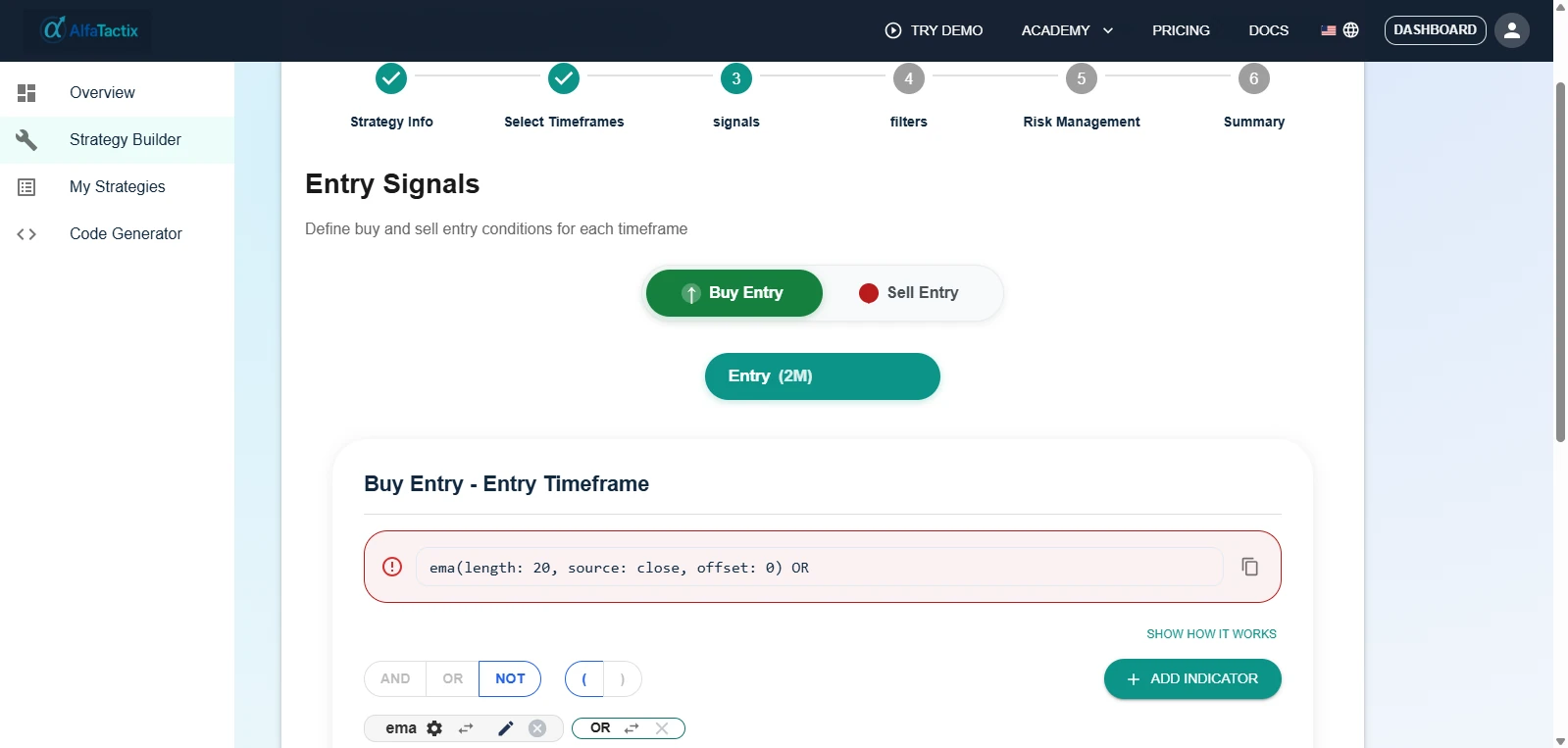
If your row in the decision matrix below is "guided MT5 rules, filters, risk, MQL5 export", open the demo, where Tactix Guide explains each step, and build one rule by hand before you commit to any tool.
Looking for an Alternative to a Specific Builder?
Start from the reason you are leaving, not from the tool's name.
| If you are leaving… | because… | try… |
|---|---|---|
| fxDreema | block wiring takes too long | EA Builder, EA Builder Pro, AlfaTactix or the MQL5 Wizard |
| fxDreema | you want AI to draft the EA | MetaEditor AI Assistant or EA Builder Pro's AI Agent |
| StrategyQuant X | the licence or the desktop setup is too heavy | Expert Advisor Studio (browser) |
| Expert Advisor Studio | you want a desktop research lab with more robustness tools | StrategyQuant X or FSB Pro |
| MQL5 Wizard | your logic doesn't fit the Standard Library modules | fxDreema, AlfaTactix or the MetaEditor AI Assistant |
| PineConnector | you want the logic native to MT5, not TradingView alerts | Any MQL5 builder above |
Other categories: Tradetron [20] is a hosted no-code algo platform that can receive signals from external tools through its API [21], and QuantConnect [22] is a code-first platform in Python and C#. Neither designs a native MQL5 EA, so they are outside this comparison.
Decision Matrix — Choose Your Path
Pick the goal that matches yours; the tool on that row is where to start.
| Your goal | Start here |
|---|---|
| Block-level control, MT4 + MT5 | fxDreema |
| Free indicators, one-time EA licence, TradeStation | EA Builder |
| Templates and an AI Agent, free plan to start | EA Builder Pro |
| Mine many strategies with a desktop robustness lab | StrategyQuant X |
| Generate strategies in the browser | Expert Advisor Studio |
| Free, official, with some MQL5 | MQL5 Wizard or MetaEditor AI Assistant |
| TradingView strategy → MT5 execution | PineConnector |
| Guided MT5 rules, filters, risk, MQL5 export | AlfaTactix Strategy Builder |
Next Steps
- New to EA builders? Read which MT5 EA builder to start with as a beginner first.
- Export or build → compile → backtest with Every tick → Strategy Tester vs Live → deploy on demo → live at small size.
Pick one row from the comparison table that matches how you think. If it is the guided-form row, spend fifteen minutes in the live demo on one entry rule, and create a free account when you are ready to save and export.